第三人称相机模式
概述
Lyra中使用到关于第三人称的三个相机模式: CM_ThirdPerson,CM_ThirdPerson_Death,CM_ThirdPersonADS
相机辅助接口
1
2
3
4
5
6
7
8
9
10
11
12
13
14
15
16
17
18
19
20
21
22
23
24
25
26
27
28
29
30
31
32
33
34
35
36
37
38
39
/** */
UINTERFACE(BlueprintType)
class ULyraCameraAssistInterface : public UInterface
{
    GENERATED_BODY()
};

class ILyraCameraAssistInterface
{
    GENERATED_BODY()
public:
    /**
     * Get the list of actors that we're allowing the camera to penetrate. Useful in 3rd person cameras
     * when you need the following camera to ignore things like the a collection of view targets, the pawn,
     * a vehicle..etc.+
     *
     * 获取我们允许摄像机穿透的演员列表。在使用第三人称摄像机时非常有用。
     * 当您需要以下摄像机忽略诸如一系列视点目标、角色、车辆等元素时,此功能非常有用。
     *
     */
    virtual void GetIgnoredActorsForCameraPentration(TArray<const AActor*>& OutActorsAllowPenetration) const { }

    /**
     * The target actor to prevent penetration on.  Normally, this is almost always the view target, which if
     * unimplemented will remain true.  However, sometimes the view target, isn't the same as the root actor
     * you need to keep in frame.
     *
     * 需要防范入侵的目标对象。通常情况下,这几乎总是视图目标,即如果视图目标未实现,则该值始终为真。然而,有时视图目标与您需要保持在画面中的根对象并不相同。
     *
     */
    virtual TOptional<AActor*> GetCameraPreventPenetrationTarget() const
    {
        return TOptional<AActor*>();
    }

    /** Called if the camera penetrates the focal target.  Useful if you want to hide the target actor when being overlapped. */
    /** 若相机穿透了焦点目标,则会调用此函数。若您希望在目标被覆盖时隐藏目标角色,则此功能非常有用。*/
    virtual void OnCameraPenetratingTarget() { }
};
定义探针(feeler)的描述
1
2
3
4
5
6
7
8
9
10
11
12
13
14
15
16
17
18
19
20
21
22
23
24
25
26
27
28
29
30
31
32
33
34
35
36
37
38
39
40
41
42
43
44
45
46
47
48
49
50
51
52
53
54
55
56
57
58
59
60
61
62
63
64
65
/**
 * Struct defining a feeler ray used for camera penetration avoidance.
 * 定义了一种用于避免相机穿透的探测射线的结构。
 */
USTRUCT()
struct FLyraPenetrationAvoidanceFeeler
{
    GENERATED_BODY()

    /** FRotator describing deviance from main ray */
    /** 描述与主射线偏差的旋转角度 */
    UPROPERTY(EditAnywhere, Category=PenetrationAvoidanceFeeler)
    FRotator AdjustmentRot;

    /** how much this feeler affects the final position if it hits the world */
    /** 这个触感装置对最终位置的影响程度,如果它触及到世界的话 */
    UPROPERTY(EditAnywhere, Category=PenetrationAvoidanceFeeler)
    float WorldWeight;

    /** how much this feeler affects the final position if it hits a APawn (setting to 0 will not attempt to collide with pawns at all) */
    /** 这个触感因素对最终位置的影响程度,如果它碰到一个“APawn”对象时会如何表现(将数值设为 0 将完全不尝试与“Pawn”对象发生碰撞) */
    UPROPERTY(EditAnywhere, Category=PenetrationAvoidanceFeeler)
    float PawnWeight;

    /** extent to use for collision when tracing this feeler */
    /** 在追踪此感知器时用于碰撞的使用范围 */
    UPROPERTY(EditAnywhere, Category=PenetrationAvoidanceFeeler)
    float Extent;

    /** minimum frame interval between traces with this feeler if nothing was hit last frame */
    /** 如果上一帧未发生任何碰撞,此探测器与相邻轨迹之间的最小帧间隔为多少 */
    UPROPERTY(EditAnywhere, Category=PenetrationAvoidanceFeeler)
    int32 TraceInterval;

    /** number of frames since this feeler was used */
    /** 自此触觉装置被使用以来的帧数 */
    UPROPERTY(transient)
    int32 FramesUntilNextTrace;


    FLyraPenetrationAvoidanceFeeler()
        : AdjustmentRot(ForceInit)
        , WorldWeight(0)
        , PawnWeight(0)
        , Extent(0)
        , TraceInterval(0)
        , FramesUntilNextTrace(0)
    {
    }

    FLyraPenetrationAvoidanceFeeler(const FRotator& InAdjustmentRot,
                                    const float& InWorldWeight,
                                    const float& InPawnWeight,
                                    const float& InExtent,
                                    const int32& InTraceInterval = 0,
                                    const int32& InFramesUntilNextTrace = 0)
        : AdjustmentRot(InAdjustmentRot)
        , WorldWeight(InWorldWeight)
        , PawnWeight(InPawnWeight)
        , Extent(InExtent)
        , TraceInterval(InTraceInterval)
        , FramesUntilNextTrace(InFramesUntilNextTrace)
    {
    }
};
第三人称相机
核心概念
角色位置
- 相机的安全位置:相机的保底位置,Lyra会计算出一个任何情况都不会被阻挡 (在Character胶囊体内) 且尽可能保留摄像机偏移的位置。Camera最终位置会在SafeLocation-无遮挡Location连线上,一般是角色位置,极端情况下就是贴着角色的。
- 相机的期望位置:相机的理想位置,一般是我们计算出来的理想值,即为混合权重后相机的位置,但由于场景会有阻挡等因素,所以只是理想值.
- 相机的实际位置:介于完全位置和期望位置之间.在0-1的范围内.
阻挡百分比:(实际位置-安全位置)/(期望位置-安全位置).在0-1范围内
- 如果阻挡百分比为1时.证明完全没有阻挡.
- 当阻挡百分比为0时.证明完全被阻挡
当阻挡百分比为0.4时,说明阻挡物在距离完全位置0.4处,距离理想相机位置0.6处.
- 当相机没有被阻挡时,它应当从
当前位置前进到理想位置,直到被阻挡或者到达理想位置. - 当相机被阻挡时,它应当从
当前位置后退至安全位置,直到不被阻挡或者到达安全位置.
是否阻挡由射线进行检测,可以多轮,也可以单轮.检测中应忽略不影响相机视线的场景对象,也可以根据对象的场景权重来判断是否有阻挡效果.
使用场景
当人物紧贴掩体站立和进出掩体时。迅速调整Camera位置以保证游戏体验。 从侧面靠近墙壁时,摄像机会有一个混合推进的过程。这个就是预防穿透机制。
如果用最朴素的想法(SpringArmComponent) 考虑这个实现:就是从PivotLocation向CameraLocation打一根射线检测; 如果中间被阻挡了,就修正相机位置到阻挡物前方。这样会导致两个表现上的风险
- 当距离较近时,实际的相机位置会偏向
PivotLocation,导致之前的Offset几乎失效。但一部分偏移特性是需要保留的,比如相机必须在人物右侧。 - 存在镜头跳切的情况,从阻挡位置回正到标准位置,可以很好的平滑实现,而在被阻挡视线的那一帧,一定会从标准位置跳切到阻挡位置。
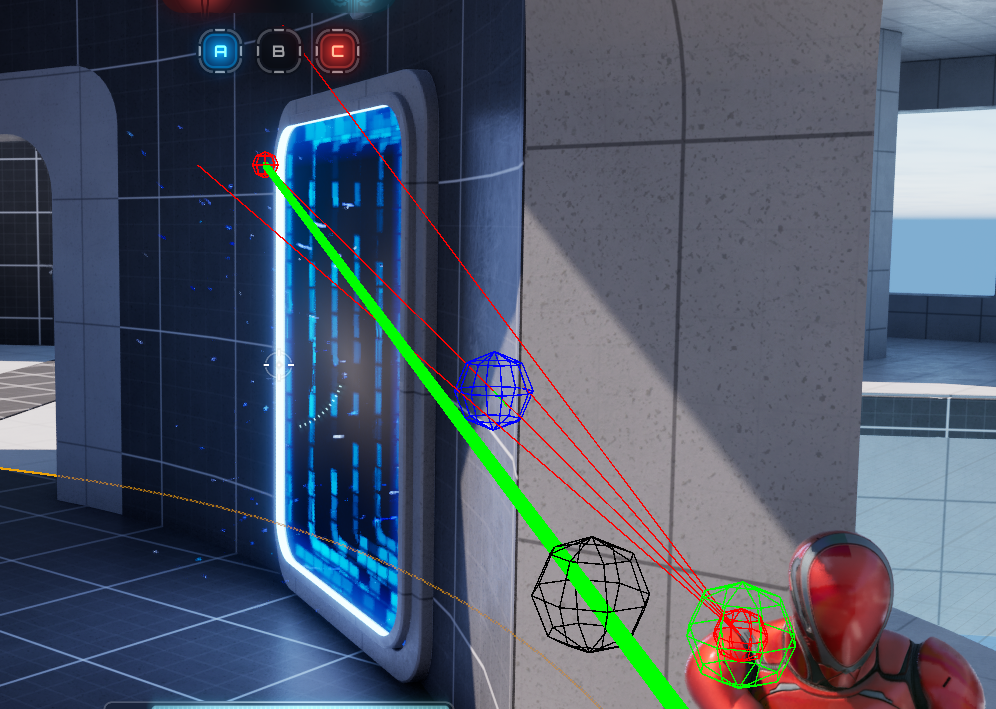
- 远端红色球为无遮挡CameraLocation,
- Character身旁的绿色球为SafeLocation,
- 红色射线为多个不同的PenetrationAvoidanceFeeler。
- 无遮挡
CameraLocation-SafeLocation红线主射线并无遮挡,但因为yaw方向上的Feeler被墙壁遮挡,所以最终的摄像机位置被修正在蓝色球处。 - 绿线为当前摄像机瞄准方向,黑色球位置为ClosestPointOnLineToCapsuleCenter(直线上距胶囊中心的最近点)。
核心函数
1
2
3
4
5
6
7
8
9
10
11
12
13
14
15
16
17
18
19
20
21
22
23
24
25
26
27
28
29
30
31
32
33
34
35
36
37
38
39
40
41
42
43
44
45
void ULyraCameraMode_ThirdPerson::UpdateView(float DeltaTime)
{
    // 更新蹲伏状态
    UpdateForTarget(DeltaTime);
    // 更新蹲伏插值
    UpdateCrouchOffset(DeltaTime);

    // 这部分代码同父类 不过添加了关于蹲伏的偏移
    FVector PivotLocation = GetPivotLocation() + CurrentCrouchOffset;
    FRotator PivotRotation = GetPivotRotation();

    PivotRotation.Pitch = FMath::ClampAngle(PivotRotation.Pitch, ViewPitchMin, ViewPitchMax);

    View.Location = PivotLocation;
    View.Rotation = PivotRotation;
    View.ControlRotation = View.Rotation;
    View.FieldOfView = FieldOfView;

    // Apply third person offset using pitch.
    // 根据pitch应用第三人称偏移量。
    // 是否使用了RuntimeFloatCurves
    if (!bUseRuntimeFloatCurves)
    {
        if (TargetOffsetCurve)
        {
            // 对曲线进行求值
            const FVector TargetOffset = TargetOffsetCurve->GetVectorValue(PivotRotation.Pitch);
            View.Location = PivotLocation + PivotRotation.RotateVector(TargetOffset);
        }
    }
    else
    {
        FVector TargetOffset(0.0f);

        TargetOffset.X = TargetOffsetX.GetRichCurveConst()->Eval(PivotRotation.Pitch);
        TargetOffset.Y = TargetOffsetY.GetRichCurveConst()->Eval(PivotRotation.Pitch);
        TargetOffset.Z = TargetOffsetZ.GetRichCurveConst()->Eval(PivotRotation.Pitch);

        View.Location = PivotLocation + PivotRotation.RotateVector(TargetOffset);
    }

    // Adjust final desired camera location to prevent any penetration
    // 调整最终所需的摄像机位置,以避免出现任何穿透情况
    UpdatePreventPenetration(DeltaTime);
}
游戏中,PivotRotation.Pitch的取值范围为[-90,90]。
相机曲线求值
1
2
3
4
5
6
7
8
9
10
11
12
13
14
15
16
17
18
19
20
21
22
23
24

    // Curve that defines local-space offsets from the target using the view pitch to evaluate the curve.
    // 定义局部空间相对于目标位置偏移量的曲线,通过视图俯仰角来评估该曲线。
    UPROPERTY(EditDefaultsOnly, Category = "Third Person", Meta = (EditCondition = "!bUseRuntimeFloatCurves"))
    TObjectPtr<const UCurveVector> TargetOffsetCurve;

    // UE-103986: Live editing of RuntimeFloatCurves during PIE does not work (unlike curve assets).
    // Once that is resolved this will become the default and TargetOffsetCurve will be removed.
    // UE-103986:在 PIE 模式下对运行时浮点曲线进行实时编辑无法正常进行(与曲线资源不同)。
    // 一旦该问题得到解决,这将成为默认设置,而 TargetOffsetCurve 将被移除。
    UPROPERTY(EditDefaultsOnly, Category = "Third Person")
    bool bUseRuntimeFloatCurves;

    // 曲线X
    UPROPERTY(EditDefaultsOnly, Category = "Third Person", Meta = (EditCondition = "bUseRuntimeFloatCurves"))
    FRuntimeFloatCurve TargetOffsetX;

    // 曲线Y
    UPROPERTY(EditDefaultsOnly, Category = "Third Person", Meta = (EditCondition = "bUseRuntimeFloatCurves"))
    FRuntimeFloatCurve TargetOffsetY;

    // 曲线Z
    UPROPERTY(EditDefaultsOnly, Category = "Third Person", Meta = (EditCondition = "bUseRuntimeFloatCurves"))
    FRuntimeFloatCurve TargetOffsetZ;
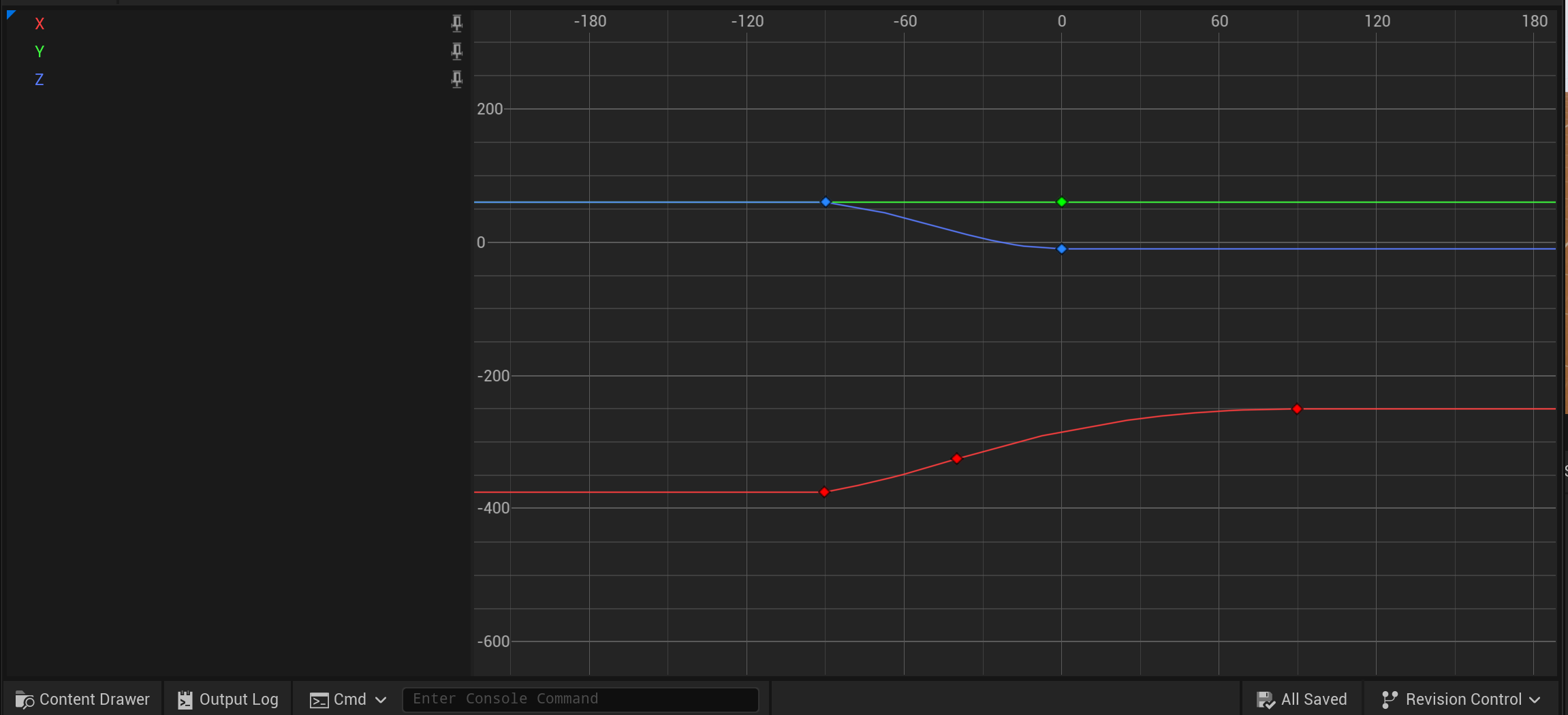 观察曲线,可以得到以下信息
- Y轴偏向始终为60,即相机总处于玩家右侧
- X轴为相机距离Character的距离,向下瞄准是较远,向上瞄准时较近。
- Z轴为相机上下的偏移,俯视角时,相机还会额外向上偏移,给玩家更好的视角。
机瞄时,仅需在这里调整曲线值拉近相机即可,例如将X轴设为一个绝对值更小的常量。 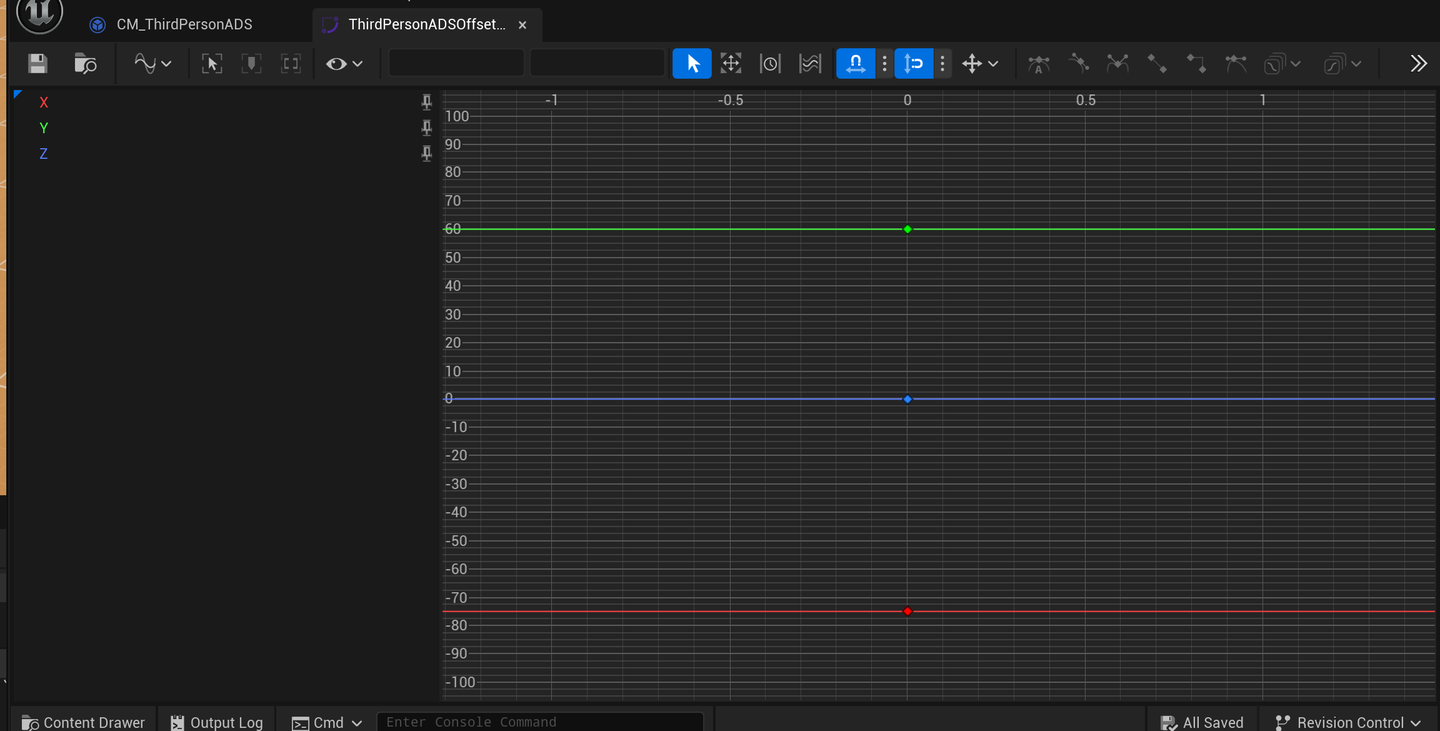
蹲伏更新判定
1
2
3
4
5
6
7
8
9
10
11
12
13
14
15
16
17
18
19
20
21
22
23
void ULyraCameraMode_ThirdPerson::UpdateForTarget(float DeltaTime)
{
    // 获取目标Actor并尝试转换为ACharacter类型
    if (const ACharacter* TargetCharacter = Cast<ACharacter>(GetTargetActor()))
    {
        // 如果目标角色处于蹲伏状态
        if (TargetCharacter->IsCrouched())
        {
            // 获取角色类的默认对象(CDO),用于获取默认的身高配置
            const ACharacter* TargetCharacterCDO = TargetCharacter->GetClass()->GetDefaultObject<ACharacter>();
            // 计算蹲伏时的眼睛高度调整值(蹲伏眼高 - 基础眼高)
            const float CrouchedHeightAdjustment = TargetCharacterCDO->CrouchedEyeHeight - TargetCharacterCDO->BaseEyeHeight;

            // 设置目标蹲伏偏移量(仅Z轴调整高度)
            SetTargetCrouchOffset(FVector(0.f, 0.f, CrouchedHeightAdjustment));

            return; // 蹲伏状态处理完成,直接返回
        }
    }

    // 非蹲伏状态时,重置目标蹲伏偏移为零向量
    SetTargetCrouchOffset(FVector::ZeroVector);
}
1
2
3
4
5
6
7
8
9
10
11
12
13
14
15
16
17
void ULyraCameraMode_ThirdPerson::UpdateCrouchOffset(float DeltaTime)
{
    // 如果蹲伏偏移的混合百分比尚未达到100%(过渡未完成)
    if (CrouchOffsetBlendPct < 1.0f)
    {
        // 按混合速度递增混合百分比,确保不超过1.0
        CrouchOffsetBlendPct = FMath::Min(CrouchOffsetBlendPct + DeltaTime * CrouchOffsetBlendMultiplier, 1.0f);
        // 使用缓入缓出插值计算当前蹲伏偏移,实现平滑过渡
        CurrentCrouchOffset = FMath::InterpEaseInOut(InitialCrouchOffset, TargetCrouchOffset, CrouchOffsetBlendPct, 1.0f);
    }
    else
    {
        // 过渡完成后,直接使用目标偏移值
        CurrentCrouchOffset = TargetCrouchOffset;
        CrouchOffsetBlendPct = 1.0f; // 确保混合百分比锁定在1.0
    }
}
更新阻止穿透
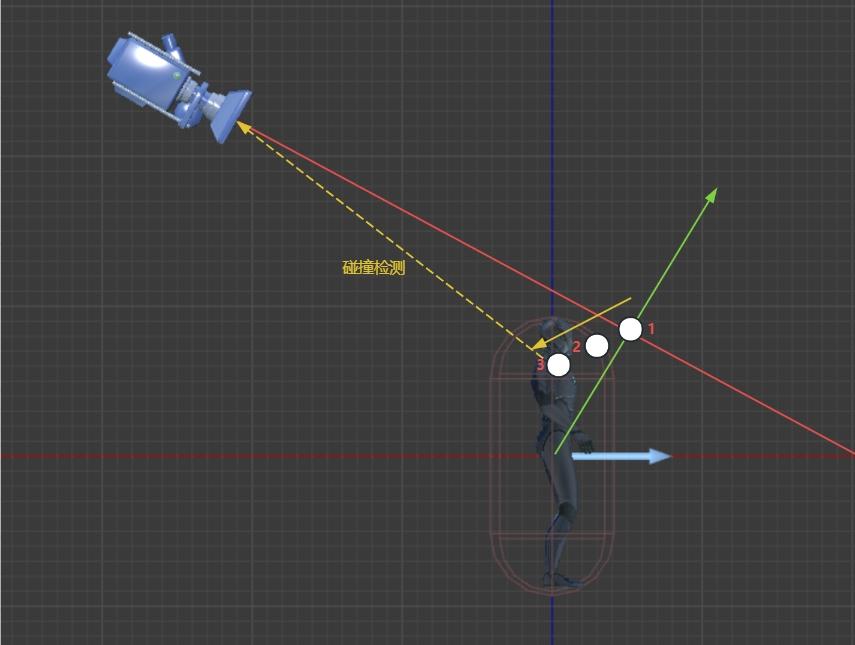 UpdatePreventPenetration流程:
ClosestPointOnLineToCapsuleCenter,CapsuleCenter与ViewTransform射线上最近的点- 整个
Capsule胶囊体表面距离ClosestPointOnLineToCapsuleCenter最近的点 - 对于2的临时位置做下处理,沿着1指向2的矢量方向平移一段距离,避免碰撞检测在起始位置就遭遇碰撞,得到的点就是碰撞检测的起始位置SafeLocation
这里知道的条件是起始检测位置是SafeLocation, 终点检测位置是ViewLocation的位置
这里注意SafeLocation并不在ViewTransform朝向的射线上,比如ViewTransform看向的是右肩,而SafeLocation在胶囊体内的一个位置点上
1
2
3
4
5
6
7
8
9
10
11
12
13
14
15
16
17
18
19
20
21
22
23
24
25
26
27
28
29
30
31
32
33
34
35
36
37
38
39
40
41
42
43
44
45
46
47
48
49
50
51
52
53
54
55
56
57
58
59
60
61
62
63
64
65
66
67
68
69
70
71
72
73
74
75
76
77
78
79
80
81
82
83
84
85
86
87
88
89
90
91
92
93
94
95
96
97
98
99
100
101
102
103
104
105
void ULyraCameraMode_ThirdPerson::UpdatePreventPenetration(float DeltaTime)
{
    // 是否考虑阻止穿透
    if (!bPreventPenetration)
    {
        return;
    }

    // 获取到我们的角色
    AActor* TargetActor = GetTargetActor();
    APawn* TargetPawn = Cast<APawn>(TargetActor);

    // 获取到控制器
    AController* TargetController = TargetPawn ? TargetPawn->GetController() : nullptr;

    // 将控制器转换为相机辅助接口
    ILyraCameraAssistInterface* TargetControllerAssist = Cast<ILyraCameraAssistInterface>(TargetController);
    // 将角色转换为相机辅助接口
    ILyraCameraAssistInterface* TargetActorAssist = Cast<ILyraCameraAssistInterface>(TargetActor);

    // 通过相机辅助接口获取 防止相机的侵入对象
    TOptional<AActor*> OptionalPPTarget = TargetActorAssist ? TargetActorAssist->GetCameraPreventPenetrationTarget() : TOptional<AActor*>();
    // 因为容器为空,或者容器的获取方法默认也是为空,那么至少我们自己是一个阻止穿透的对象!
    // 这里是我们的角色
    AActor* PPActor = OptionalPPTarget.IsSet() ? OptionalPPTarget.GetValue() : TargetActor;

    // 这里还是空的 因为我们没有实现
    // 这里有可能是我们的视图对象
    ILyraCameraAssistInterface* PPActorAssist = OptionalPPTarget.IsSet() ? Cast<ILyraCameraAssistInterface>(PPActor) : nullptr;

    // 拿到我们当前阻止穿透的根组件
    const UPrimitiveComponent* PPActorRootComponent = Cast<UPrimitiveComponent>(PPActor->GetRootComponent());
    if (PPActorRootComponent)
    {
        // Attempt at picking SafeLocation automatically, so we reduce camera translation when aiming.
        // Our camera is our reticle, so we want to preserve our aim and keep that as steady and smooth as possible.
        // Pick closest point on capsule to our aim line.
        // 尝试自动选择安全位置,这样在瞄准时就能减少相机的移动。
        // 我们的相机就是瞄准点,所以我们需要保持瞄准状态,并尽可能使其保持稳定和平滑。
        // 选择与瞄准线最近的胶囊上的点。

        // 胶囊体中心到在视线上的最近点
        FVector ClosestPointOnLineToCapsuleCenter;
        // 相机的安全位置(通常为角色位置)
        FVector SafeLocation = PPActor->GetActorLocation();

        // 计算给定点在世界空间中的位置与由向量对(起始点,方向)所定义的给定直线之间的距离。
        // 胶囊体中心到线的最近点,这个线是指相机位置沿着相机方向的这根线
        // 这个点代表了在视线方向上最接近角色的位置
        FMath::PointDistToLine(SafeLocation, View.Rotation.Vector(), View.Location, ClosestPointOnLineToCapsuleCenter);

        // Adjust Safe distance height to be same as aim line, but within capsule.
        // 将安全距离的高度调整为与瞄准线相同,但要在胶囊范围内。

        // 计算推入距离:第一个探测器的半径 + 碰撞推出距离
        float const PushInDistance = PenetrationAvoidanceFeelers[0].Extent + CollisionPushOutDistance;
        // 计算最大半高:角色的碰撞半高减去推入距离,确保安全位置在胶囊体内
        float const MaxHalfHeight = PPActor->GetSimpleCollisionHalfHeight() - PushInDistance;
        // 将安全位置的Z坐标限制在胶囊体的垂直范围内 	确保安全位置不会超出角色的碰撞体积
        // 这一步可能有点多余 但是主要时体现思想 因为在下面进行了重写
        SafeLocation.Z = FMath::Clamp(ClosestPointOnLineToCapsuleCenter.Z, SafeLocation.Z - MaxHalfHeight, SafeLocation.Z + MaxHalfHeight);


        float DistanceSqr;
        // 返回到最近的物体实例表面的距离的平方值。
        // 并且将安全位置更新为碰撞体表面的最近点
        PPActorRootComponent->GetSquaredDistanceToCollision(ClosestPointOnLineToCapsuleCenter,
            DistanceSqr,
            SafeLocation);

        // Push back inside capsule to avoid initial penetration when doing line checks.
        // 向内推移至胶囊内部,以避免在进行线路检查时出现初始穿透的情况。
        if (PenetrationAvoidanceFeelers.Num() > 0)
        {
            SafeLocation += (SafeLocation - ClosestPointOnLineToCapsuleCenter).GetSafeNormal() * PushInDistance;
        }

        // Then aim line to desired camera position
        // 然后将瞄准线调整至期望的摄像机位置
        // 确定是否只使用单射线检测:如果不进行预测性避免,则使用单射线
        bool const bSingleRayPenetrationCheck = !bDoPredictiveAvoidance;
        PreventCameraPenetration(*PPActor,
            SafeLocation,
            View.Location,
            DeltaTime,
            AimLineToDesiredPosBlockedPct,
            bSingleRayPenetrationCheck);

        ILyraCameraAssistInterface* AssistArray[] = { TargetControllerAssist, TargetActorAssist, PPActorAssist };

        //如果相机阻挡百分比低于阈值,则说明过于接近
        if (AimLineToDesiredPosBlockedPct < ReportPenetrationPercent)
        {
            for (ILyraCameraAssistInterface* Assist : AssistArray)
            {
                if (Assist)
                {
                    // camera is too close, tell the assists
                    // 相机距离太近了,请告知助手们
                    Assist->OnCameraPenetratingTarget();
                }
            }
        }
    }
}
通知控制器 这一帧隐藏对象
1
2
3
4
void ALyraPlayerController::OnCameraPenetratingTarget()
{
    bHideViewTargetPawnNextFrame = true;
}
1
2
3
4
5
6
7
8
9
10
11
12
13
14
15
16
17
18
19
20
21
22
23
24
25
26
27
28
29
30
31
32
33
34
35
36
37
38
39
40
41
42
43
44
45
46
47
48
49
50
51
52
53
54
55
56
57
58
59
void ALyraPlayerController::UpdateHiddenComponents(const FVector& ViewLocation, TSet<FPrimitiveComponentId>& OutHiddenComponents)
{
    Super::UpdateHiddenComponents(ViewLocation, OutHiddenComponents);

    if (bHideViewTargetPawnNextFrame)
    {
        AActor* const ViewTargetPawn = PlayerCameraManager ? Cast<AActor>(PlayerCameraManager->GetViewTarget()) : nullptr;
        if (ViewTargetPawn)
        {
            // internal helper func to hide all the components
            // 内部辅助函数,用于隐藏所有组件
            auto AddToHiddenComponents = [&OutHiddenComponents](const TInlineComponentArray<UPrimitiveComponent*>& InComponents)
            {
                // add every component and all attached children
                // 添加每个组件及其所有附属子元素
                for (UPrimitiveComponent* Comp : InComponents)
                {
                    if (Comp->IsRegistered())
                    {
                        OutHiddenComponents.Add(Comp->GetPrimitiveSceneId());

                        for (USceneComponent* AttachedChild : Comp->GetAttachChildren())
                        {
                            static FName NAME_NoParentAutoHide(TEXT("NoParentAutoHide"));
                            UPrimitiveComponent* AttachChildPC = Cast<UPrimitiveComponent>(AttachedChild);
                            if (AttachChildPC && AttachChildPC->IsRegistered() && !AttachChildPC->ComponentTags.Contains(NAME_NoParentAutoHide))
                            {
                                OutHiddenComponents.Add(AttachChildPC->GetPrimitiveSceneId());
                            }
                        }
                    }
                }
            };

            //TODO Solve with an interface.  Gather hidden components or something.
            //TODO Hiding isn't awesome, sometimes you want the effect of a fade out over a proximity, needs to bubble up to designers.

            // 请使用接口来解决这个问题。可以整合一些隐藏功能或者采取其他措施。
            // 请不要将隐藏操作视为完美解决方案,有时您可能希望在接近目标时产生逐渐淡出的效果,这需要与设计师进行沟通。

            // hide pawn's components
            // 隐藏棋子的组件
            TInlineComponentArray<UPrimitiveComponent*> PawnComponents;
            ViewTargetPawn->GetComponents(PawnComponents);
            AddToHiddenComponents(PawnComponents);

            //// hide weapon too
            //if (ViewTargetPawn->CurrentWeapon)
            //{
            //	TInlineComponentArray<UPrimitiveComponent*> WeaponComponents;
            //	ViewTargetPawn->CurrentWeapon->GetComponents(WeaponComponents);
            //	AddToHiddenComponents(WeaponComponents);
            //}
        }

        // we consumed it, reset for next frame
        bHideViewTargetPawnNextFrame = false;
    }
}
阻止相机穿透
1
2
3
4
5
6
7
8
9
10
11
12
13
14
15
16
17
18
19
20
21
22
23
24
25
26
27
28
29
30
31
32
33
34
35
36
37
38
39
40
41
42
43
44
45
46
47
48
49
50
51
52
53
54
55
56
57
58
59
60
61
62
63
64
65
66
67
68
69
70
71
72
73
74
75
76
77
78
79
80
81
82
83
84
85
86
87
88
89
90
91
92
93
94
95
96
97
98
99
100
101
102
103
104
105
106
107
108
109
110
111
112
113
114
115
116
117
118
119
120
121
122
123
124
125
126
127
128
129
130
131
132
133
134
135
136
137
138
139
140
141
142
143
144
145
146
147
148
149
150
151
152
153
154
155
156
157
158
159
160
161
162
163
164
165
166
167
168
169
170
171
172
173
174
175
176
177
178
179
180
181
182
183
184
185
186
187
188
189
190
191
192
193
194
195
196
197
198
199
200
201
202
203
204
205
206
207
208
209
210
211
212
213
214
215
216
217
218
219
220
221
222
223
224
225
226
227
228
229
230
231
232
233
234
235
236
237
238
239
240
241
242
243
244
245
246
247
248
249
250
251
252
253
254
255
256
257
258
259
260
261
262
263
264
265
266
267
268
269
270
271
272
273
274
275
276
277
278
279
280
281
282
283
284
285
286
287
void ULyraCameraMode_ThirdPerson::PreventCameraPenetration(class AActor const& ViewTarget,
    FVector const& SafeLoc,
    FVector& CameraLoc,
    float const& DeltaTime,
    float& DistBlockedPct,
    bool bSingleRayOnly)
{
#if ENABLE_DRAW_DEBUG
    // 在调试模式下重置被击中的角色列表
    DebugActorsHitDuringCameraPenetration.Reset();
#endif

    // 初始化硬阻挡和软阻挡百分比为当前值
    float HardBlockedPct = DistBlockedPct;
    float SoftBlockedPct = DistBlockedPct;

    // 计算基础射线:从安全位置到相机位置的向量
    FVector BaseRay = CameraLoc - SafeLoc;
    // 创建基础射线的旋转矩阵
    FRotationMatrix BaseRayMatrix(BaseRay.Rotation());

    // 提取局部坐标系的三个轴向向量
    FVector BaseRayLocalUp, BaseRayLocalFwd, BaseRayLocalRight;
    BaseRayMatrix.GetScaledAxes(BaseRayLocalFwd, BaseRayLocalRight, BaseRayLocalUp);

    // 初始化当前帧的阻挡百分比为1.0(完全无阻挡)
    float DistBlockedPctThisFrame = 1.f;

    // 确定要发射的射线数量:
    // 如果只使用单射线,取1和探测器数量的最小值
    // 否则使用所有探测器
    int32 const NumRaysToShoot = bSingleRayOnly ? FMath::Min(1, PenetrationAvoidanceFeelers.Num()) : PenetrationAvoidanceFeelers.Num();
    // 创建碰撞查询参数,使用相机穿透统计组
    FCollisionQueryParams SphereParams(SCENE_QUERY_STAT(CameraPen), false, nullptr/*PlayerCamera*/);

    // 忽略视图目标角色,避免与自身发生碰撞
    SphereParams.AddIgnoredActor(&ViewTarget);

    // 这里可以考虑去读取我们的相机接口里面的函数
    //TODO ILyraCameraTarget.GetIgnoredActorsForCameraPentration();
    //if (IgnoreActorForCameraPenetration)
    //{
    //	SphereParams.AddIgnoredActor(IgnoreActorForCameraPenetration);
    //}

    // 创建球体碰撞形状,初始半径为0
    FCollisionShape SphereShape = FCollisionShape::MakeSphere(0.f);
    // 获取世界上下文
    UWorld* World = GetWorld();

    // 遍历所有要发射的射线
    for (int32 RayIdx = 0; RayIdx < NumRaysToShoot; ++RayIdx)
    {
        // 获取当前探测器的引用
        FLyraPenetrationAvoidanceFeeler& Feeler = PenetrationAvoidanceFeelers[RayIdx];
        // 检查是否需要进行追踪(帧计数<=0)
        if (Feeler.FramesUntilNextTrace <= 0)
        {
            // calc ray target
            /**
             * 计算射线目标位置:
             *
             * 首先绕上向量旋转偏航角
             *
             * 然后绕右向量旋转俯仰角
             *
             * 最终得到相对于安全位置的偏移目标
             *
             */
            FVector RayTarget;
            {
                FVector RotatedRay = BaseRay.RotateAngleAxis(Feeler.AdjustmentRot.Yaw, BaseRayLocalUp);
                RotatedRay = RotatedRay.RotateAngleAxis(Feeler.AdjustmentRot.Pitch, BaseRayLocalRight);
                RayTarget = SafeLoc + RotatedRay;
            }

            // cast for world and pawn hits separately.  this is so we can safely ignore the
            // camera's target pawn

            // 分别为世界碰撞和兵种碰撞设置投射对象。这样做是为了能够安全地忽略摄像机所瞄准的兵种。

            // 设置球体碰撞检测的半径为探测器的范围
            SphereShape.Sphere.Radius = Feeler.Extent;
            // 设置追踪通道为相机通道

            ECollisionChannel TraceChannel = ECC_Camera;		//(Feeler.PawnWeight > 0.f) ? ECC_Pawn : ECC_Camera;

            // do multi-line check to make sure the hits we throw out aren't
            // masking real hits behind (these are important rays).
            // 进行多行检查,以确保我们剔除掉的那些射线并非掩盖了实际存在的射线(这些射线非常重要)。

            // MT-> passing camera as actor so that camerablockingvolumes know when it's the camera doing traces

            // 执行球体扫描碰撞检测:
            // 从安全位置到射线目标
            // 使用球体形状和相机碰撞通道

            FHitResult Hit;
            const bool bHit = World->SweepSingleByChannel(Hit,
                SafeLoc,
                RayTarget,
                FQuat::Identity,
                TraceChannel,
                SphereShape,
                SphereParams);
#if ENABLE_DRAW_DEBUG
            // 调试模式下绘制碰撞检测的可视化:
            // 在起点和终点绘制球体
            // 	绘制连接线
            if (World->TimeSince(LastDrawDebugTime) < 1.f)
            {
                DrawDebugSphere(World, SafeLoc, SphereShape.Sphere.Radius, 8, FColor::Red);
                DrawDebugSphere(World, bHit ? Hit.Location : RayTarget, SphereShape.Sphere.Radius, 8, FColor::Red);
                DrawDebugLine(World, SafeLoc, bHit ? Hit.Location : RayTarget, FColor::Red);
            }
#endif // ENABLE_DRAW_DEBUG
            // 重置探测器的追踪间隔计数
            Feeler.FramesUntilNextTrace = Feeler.TraceInterval;

            // 获取被击中的角色
            const AActor* HitActor = Hit.GetActor();

            // 如果发生碰撞且击中了有效角色,初始化忽略标志为false
            if (bHit && HitActor)
            {
                bool bIgnoreHit = false;

                // 如果角色有忽略相机碰撞的标签,则忽略此次碰撞
                // 并将该角色添加到忽略列表中
                if (HitActor->ActorHasTag(LyraCameraMode_ThirdPerson_Statics::NAME_IgnoreCameraCollision))
                {
                    bIgnoreHit = true;
                    SphereParams.AddIgnoredActor(HitActor);
                }

                // Ignore CameraBlockingVolume hits that occur in front of the ViewTarget.
                // 忽略发生在视图目标前方的相机阻塞区域碰撞事件。

                /**
                 * 特殊处理相机阻挡体积:
                 *
                 * 计算视图目标的前方向量(2D标准化)
                 *
                 * 计算击中点相对于视图目标的方向
                 * 如果点积>0,说明击中点在角色前方,忽略此次碰撞
                 * 否则,在调试模式下记录被击中的角色
                 *
                 */
                if (!bIgnoreHit && HitActor->IsA<ACameraBlockingVolume>())
                {
                    const FVector ViewTargetForwardXY = ViewTarget.GetActorForwardVector().GetSafeNormal2D();
                    const FVector ViewTargetLocation = ViewTarget.GetActorLocation();
                    const FVector HitOffset = Hit.Location - ViewTargetLocation;
                    const FVector HitDirectionXY = HitOffset.GetSafeNormal2D();
                    const float DotHitDirection = FVector::DotProduct(ViewTargetForwardXY, HitDirectionXY);
                    if (DotHitDirection > 0.0f)
                    {
                        bIgnoreHit = true;
                        // Ignore this CameraBlockingVolume on the remaining sweeps.
                        // 对剩余的扫描操作忽略此“相机阻挡区域”。
                        SphereParams.AddIgnoredActor(HitActor);
                    }
                    else
                    {
#if ENABLE_DRAW_DEBUG
                        DebugActorsHitDuringCameraPenetration.AddUnique(TObjectPtr<const AActor>(HitActor));
#endif
                    }
                }
                /**
                 * 如果没有忽略此次碰撞,计算权重:
                 * 如果击中的是Pawn,使用Pawn权重
                 * 否则使用世界权重
                 */
                if (!bIgnoreHit)
                {
                    float const Weight = Cast<APawn>(Hit.GetActor()) ? Feeler.PawnWeight : Feeler.WorldWeight;

                    // 计算新的阻挡百分比:
                    // 初始值为碰撞时间(0-1,1表示无碰撞)
                    // 根据权重调整阻挡百分比

                    float NewBlockPct = Hit.Time;
                    NewBlockPct += (1.f - NewBlockPct) * (1.f - Weight);

                    // Recompute blocked pct taking into account pushout distance.
                    // 考虑推出距离后重新计算阻塞百分比。

                    // (击中点距离 - 推出距离)/ 总射线长度

                    NewBlockPct = ((Hit.Location - SafeLoc).Size() - CollisionPushOutDistance) / (RayTarget - SafeLoc).Size();

                    // 更新当前帧的最小阻挡百分比
                    DistBlockedPctThisFrame = FMath::Min(NewBlockPct, DistBlockedPctThisFrame);

                    // This feeler got a hit, so do another trace next frame
                    // 这次探测器成功触发了,所以下一帧要再进行一次探测。
                    Feeler.FramesUntilNextTrace = 0;

#if ENABLE_DRAW_DEBUG
                    // 调试模式下记录被击中的角色
                    DebugActorsHitDuringCameraPenetration.AddUnique(TObjectPtr<const AActor>(HitActor));
#endif
                }
            }
            // 如果是第一个射线(主射线),更新硬阻挡百分比
            // 否则更新软阻挡百分比
            if (RayIdx == 0)
            {
                // don't interpolate toward this one, snap to it
                // assumes ray 0 is the center/main ray
                // 不要向这一侧倾斜,直接朝它靠拢
                // 假设第 0 条射线是中心/主射线
                HardBlockedPct = DistBlockedPctThisFrame;
            }
            else
            {
                SoftBlockedPct = DistBlockedPctThisFrame;
            }
        }
        else
        {
            //如果不需要追踪,减少帧计数
            --Feeler.FramesUntilNextTrace;
        }
    }


    // 如果需要重置插值,直接设置阻挡百分比为当前帧值
    if (bResetInterpolation)
    {
        DistBlockedPct = DistBlockedPctThisFrame;
    }
    else if (DistBlockedPct < DistBlockedPctThisFrame)
    {
        // 如果当前阻挡百分比小于当前帧值(相机正在移出穿透状态):
        // 使用混合输出时间进行平滑插值

        // interpolate smoothly out
        // 平滑地向外延伸
        if (PenetrationBlendOutTime > DeltaTime)
        {
            DistBlockedPct = DistBlockedPct + DeltaTime / PenetrationBlendOutTime * (DistBlockedPctThisFrame - DistBlockedPct);
        }
        else
        {
            // 如果时间过短,直接设置
            DistBlockedPct = DistBlockedPctThisFrame;
        }
    }
    else
    {
        // 否则(相机正在进入或保持穿透状态):

        // 如果大于硬阻挡百分比,直接截断
        // 如果大于软阻挡百分比,使用混合输入时间进行平滑插值

        if (DistBlockedPct > HardBlockedPct)
        {
            DistBlockedPct = HardBlockedPct;
        }
        else if (DistBlockedPct > SoftBlockedPct)
        {
            // interpolate smoothly in
            // 以平滑的方式进行插值
            if (PenetrationBlendInTime > DeltaTime)
            {
                DistBlockedPct = DistBlockedPct - DeltaTime / PenetrationBlendInTime * (DistBlockedPct - SoftBlockedPct);
            }
            else
            {
                DistBlockedPct = SoftBlockedPct;
            }
        }
    }
    // 将阻挡百分比限制在0-1范围内
    DistBlockedPct = FMath::Clamp<float>(DistBlockedPct, 0.f, 1.f);

    // 如果阻挡百分比足够小(需要调整相机位置):
    // 根据阻挡百分比插值计算新的相机位置
    // 将相机从安全位置向原始位置移动指定百分比的距离

    if (DistBlockedPct < (1.f - ZERO_ANIMWEIGHT_THRESH))
    {
        CameraLoc = SafeLoc + (CameraLoc - SafeLoc) * DistBlockedPct;
    }
}
第三人称相机的代码
1
2
3
4
5
6
7
8
9
10
11
12
13
14
15
16
17
18
19
20
21
22
23
24
25
26
27
28
29
30
31
32
33
34
35
36
37
38
39
40
41
42
43
44
45
46
47
48
49
50
51
52
53
54
55
56
57
58
59
60
61
62
63
64
65
66
67
68
69
70
71
72
73
74
75
76
77
78
79
80
81
82
83
84
85
86
87
88
89
90
91
92
93
94
95
96
97
98
99
100
101
102
103
104
105
106
107
108
109
110
111
112
113
114
115
116
117
118
119
120
121
122
123
124
125
126
127
128
129
130
131
132
133
134
135
136
/**
 * ULyraCameraMode_ThirdPerson
 *
 *	A basic third person camera mode.
 *	一种基本的第三人称拍摄模式。
 */
UCLASS(Abstract, Blueprintable)
class ULyraCameraMode_ThirdPerson : public ULyraCameraMode
{
    GENERATED_BODY()

public:
    // 构造函数 定义使用的探测射线
    ULyraCameraMode_ThirdPerson();

protected:

    // 重写方法 更新视角
    virtual void UpdateView(float DeltaTime) override;

    // 更新当前的角色蹲伏状态
    void UpdateForTarget(float DeltaTime);
    void UpdatePreventPenetration(float DeltaTime);
    // 函数定义,接收视图目标、安全位置、相机位置(引用)、时间增量、阻挡百分比(引用)和单射线标志
    void PreventCameraPenetration(class AActor const& ViewTarget, FVector const& SafeLoc, FVector& CameraLoc, float const& DeltaTime, float& DistBlockedPct, bool bSingleRayOnly);

    // 绘制调试信息
    virtual void DrawDebug(UCanvas* Canvas) const override;

protected:

    // Curve that defines local-space offsets from the target using the view pitch to evaluate the curve.
    // 定义局部空间相对于目标位置偏移量的曲线,通过视图俯仰角来评估该曲线。
    UPROPERTY(EditDefaultsOnly, Category = "Third Person", Meta = (EditCondition = "!bUseRuntimeFloatCurves"))
    TObjectPtr<const UCurveVector> TargetOffsetCurve;

    // UE-103986: Live editing of RuntimeFloatCurves during PIE does not work (unlike curve assets).
    // Once that is resolved this will become the default and TargetOffsetCurve will be removed.
    // UE-103986:在 PIE 模式下对运行时浮点曲线进行实时编辑无法正常进行(与曲线资源不同)。
    // 一旦该问题得到解决,这将成为默认设置,而 TargetOffsetCurve 将被移除。
    UPROPERTY(EditDefaultsOnly, Category = "Third Person")
    bool bUseRuntimeFloatCurves;

    // 曲线X
    UPROPERTY(EditDefaultsOnly, Category = "Third Person", Meta = (EditCondition = "bUseRuntimeFloatCurves"))
    FRuntimeFloatCurve TargetOffsetX;

    // 曲线Y
    UPROPERTY(EditDefaultsOnly, Category = "Third Person", Meta = (EditCondition = "bUseRuntimeFloatCurves"))
    FRuntimeFloatCurve TargetOffsetY;

    // 曲线Z
    UPROPERTY(EditDefaultsOnly, Category = "Third Person", Meta = (EditCondition = "bUseRuntimeFloatCurves"))
    FRuntimeFloatCurve TargetOffsetZ;

    // Alters the speed that a crouch offset is blended in or out
    // 改变蹲姿偏移量的混合速度(即混合进或混合出的速度)
    UPROPERTY(EditAnywhere, BlueprintReadWrite, Category = "Third Person")
    float CrouchOffsetBlendMultiplier = 5.0f;

    // Penetration prevention
    // 侵入防护
public:
    // 侵入混入
    UPROPERTY(EditAnywhere, BlueprintReadWrite, Category="Collision")
    float PenetrationBlendInTime = 0.1f;

    // 侵入混出
    UPROPERTY(EditAnywhere, BlueprintReadWrite, Category="Collision")
    float PenetrationBlendOutTime = 0.15f;

    /** If true, does collision checks to keep the camera out of the world. */
    /** 若为真,则会进行碰撞检测,以确保摄像机不会进入游戏世界。*/
    UPROPERTY(EditAnywhere, BlueprintReadWrite, Category="Collision")
    bool bPreventPenetration = true;

    /** If true, try to detect nearby walls and move the camera in anticipation.  Helps prevent popping. */
    /** 若为真,则尝试检测附近墙壁并提前移动摄像机。此举有助于避免画面出现抖动现象。*/
    UPROPERTY(EditAnywhere, BlueprintReadWrite, Category="Collision")
    bool bDoPredictiveAvoidance = true;

    // 碰撞退出距离
    UPROPERTY(EditAnywhere, BlueprintReadWrite, Category = "Collision")
    float CollisionPushOutDistance = 2.f;

    /** When the camera's distance is pushed into this percentage of its full distance due to penetration */
    /** 当相机的拍摄距离因穿透作用而缩短至其最大距离的这一比例时 */
    UPROPERTY(EditAnywhere, BlueprintReadWrite, Category = "Collision")
    float ReportPenetrationPercent = 0.f;

    /**
     * These are the feeler rays that are used to find where to place the camera.
     * Index: 0  : This is the normal feeler we use to prevent collisions.
     * Index: 1+ : These feelers are used if you bDoPredictiveAvoidance=true, to scan for potential impacts if the player
     *             were to rotate towards that direction and primitively collide the camera so that it pulls in before
     *             impacting the occluder.
     */
    /**
     * 这些是用于确定摄像机放置位置的探测光束。
     * 编号:0 :这是我们常用的常规探测光束,用于避免碰撞。
     * 编号:1+ :如果“bDoPredictiveAvoidance=true”,则使用这些探测光束来扫描潜在的碰撞情况,假设玩家会朝那个方向旋转并与摄像机发生初步碰撞,从而在撞击到遮挡物之前将摄像机拉近。
     *
     */
    UPROPERTY(EditDefaultsOnly, Category = "Collision")
    TArray<FLyraPenetrationAvoidanceFeeler> PenetrationAvoidanceFeelers;

    // 临时变量 瞄准线和期望相机的调整距离
    UPROPERTY(Transient)
    float AimLineToDesiredPosBlockedPct;

    // 临时变量
    // 相机侵入时 用于调试的对象的数据
    UPROPERTY(Transient)
    TArray<TObjectPtr<const AActor>> DebugActorsHitDuringCameraPenetration;

#if ENABLE_DRAW_DEBUG
    // debug绘制时间
    mutable float LastDrawDebugTime = -MAX_FLT;
#endif

protected:
    // 设置目标蹲伏偏移
    void SetTargetCrouchOffset(FVector NewTargetOffset);
    // 更新蹲伏时的偏移
    void UpdateCrouchOffset(float DeltaTime);

    // 初始化蹲伏偏移
    FVector InitialCrouchOffset = FVector::ZeroVector;
    // 期望的蹲伏偏移
    FVector TargetCrouchOffset = FVector::ZeroVector;
    // 蹲伏混入度
    float CrouchOffsetBlendPct = 1.0f;
    // 现在的蹲伏偏移值
    FVector CurrentCrouchOffset = FVector::ZeroVector;

};
总结
注意相机功能和外部功能的联动即可. 如GAS过来设置技能相机,如开镜,死亡等,读取当前的开镜进度. 如相机和人物重叠时,发生穿透时,通过控制器来隐藏此帧的人物.
SpringArm方案中,相机和Character是强绑定,游戏中经常出现强制旋转角色的需求,这时候相机会有一两帧的抖动, 而Lyra方案则更为灵活;
调用完
Character::SetRotation后再调用SpringArmComponent->TickComponent(0, ELevelTick::LEVELTICK_All, nullptr)可以解决这个问题
- 数据驱动的优势,利用
Stack-CameraMode模式,玩法可以动态替换而不用替换或者修改CameraComponent; - Feeler对比SpringArm的优势,对于复杂地形更加稳定;