前言
将讲解Lyra是如何通过数据驱动相机系统,并与传统的弹簧臂组件(SpringArmComponent)进行一定的区别 但具体到开发实现上,例如射击游戏中的腰射/机瞄/倍镜/固定武器,ACT(Action Game)中的自由/锁定视角中,真实的需求只是通过同样的参数组去实现不同的相机逻辑。以及如果需要在Runtime中频繁切换组件层级Object未免有些繁琐。相较之下,用不同的模式去解耦这些逻辑会更加灵活。
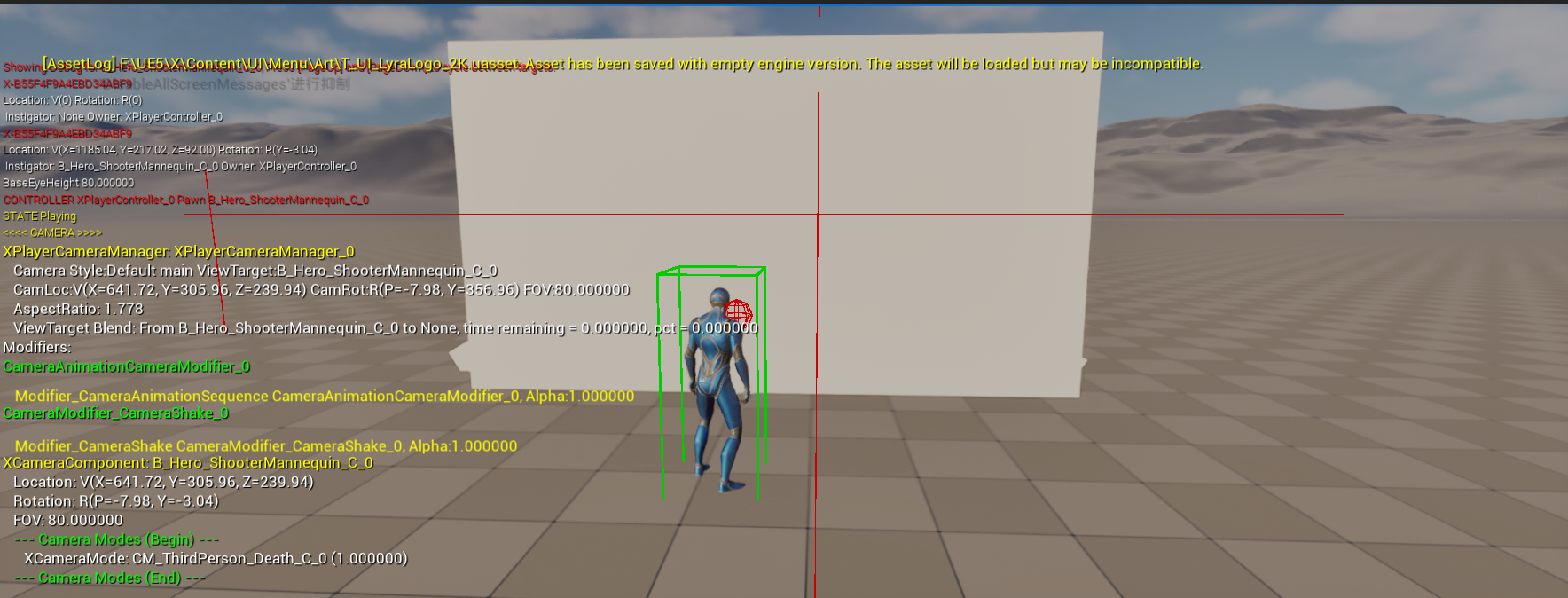
调试命令
ShowDebug CAMERA
请用编辑器得下窗口运行改命令,如果以新建编辑器窗口(PIE) 运行会导致崩溃.
相机管理机制
引擎默认的相机系统
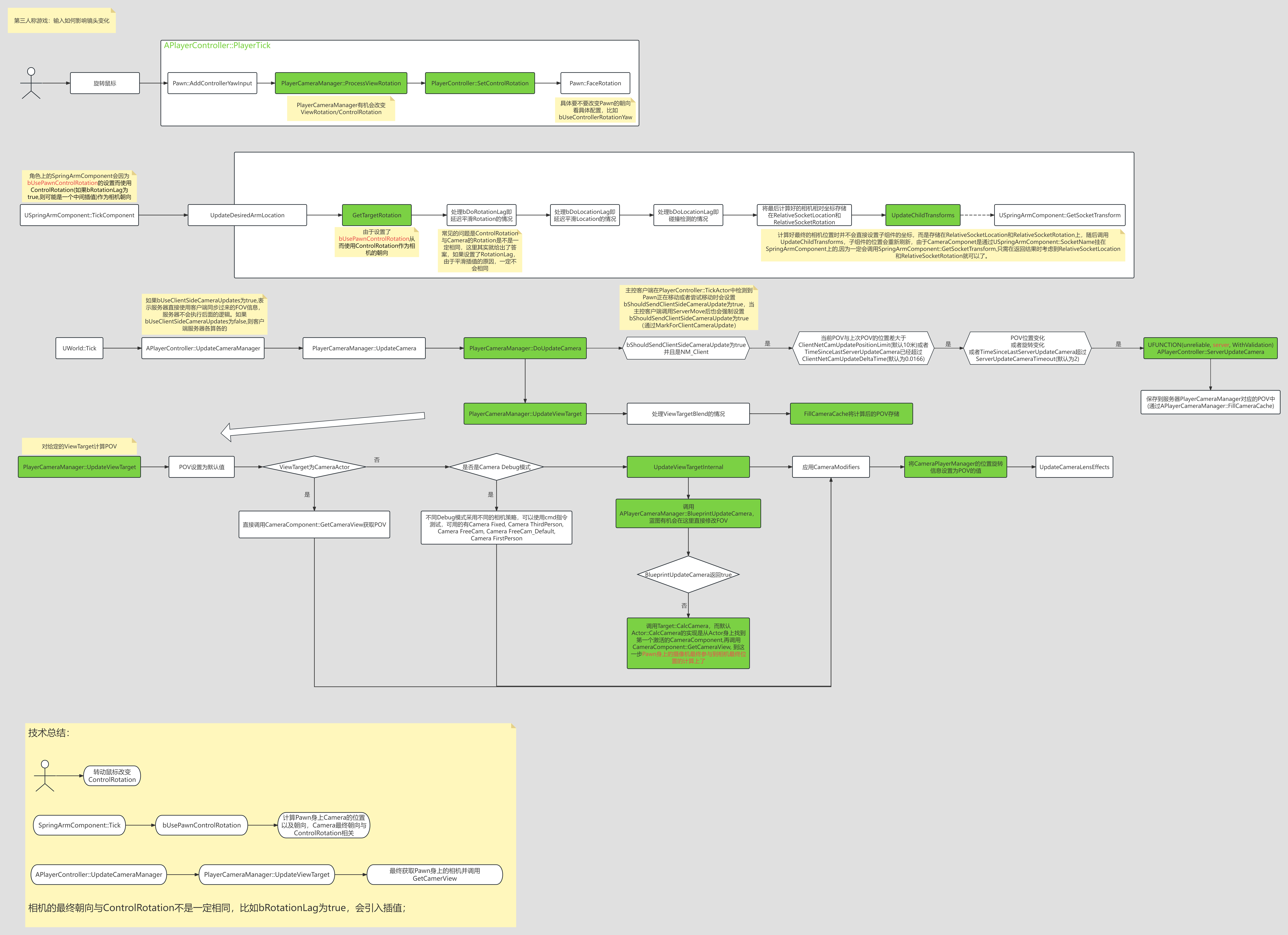
PlayerCameraManager中有个很重要的函数是UpdateViewTarget,只要重载这个函数就可以接管Gameplay中Camera的管理。
- 输入改变
ControlRotation; SpringArmComponent使用ControlRotation改变ChildActor(即CameraComponent)的RelativeTransform;CameraManager在计算最终相机POV 时最终调用的是Pawn身上挂载的CameraComponent的CameraComponent::GetCameraView函数;
CameraComponent中的重要函数是GetCameraView,重载这个函数可以做很多Gameplay相关的逻辑或者设计,Lyra正是利用了这一点。
POV是Point of View的缩写,意思是视角或视点。常见的POV:第一人称、第三人称、俯视视角. FOV是Field of View的缩写,意思是视野或视场角。它指的是通过镜头(或你的眼睛)所能观察到的世界范围的广度,通常用角度来表示。
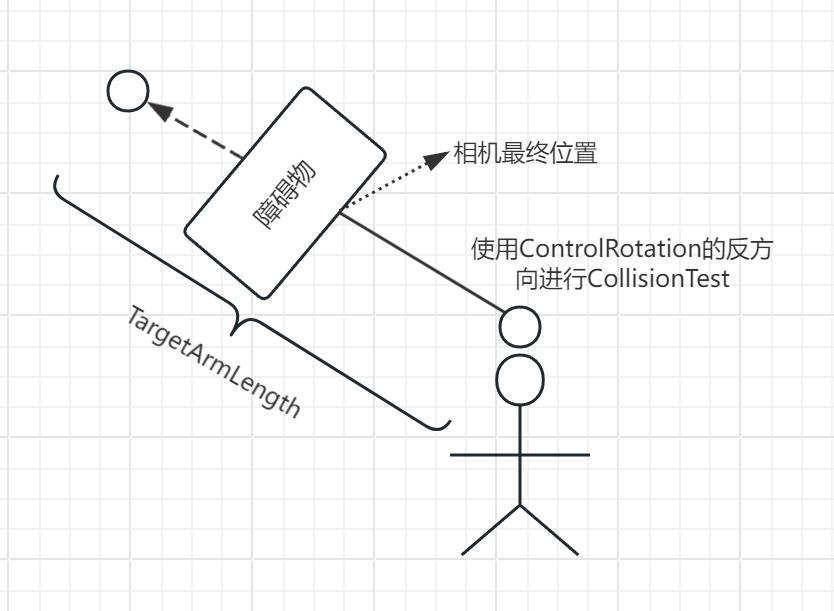
SpringArmComponent的核心在于UpdateDesiredArmLocation函数,这个函数会计算相机最终的位置和朝向,如果设置了bUsePawnControlRotation那么会使用ControlRotation, 而最终位置就需要使用CollisionTest的函数, 比如SweepSingleByChannel,如果发生了碰撞,那么最终的位置跟碰撞点有关,如下图所示:
Lyra相机系统
在Lyra中,实现了分层的相机管理机制。
1
2
3
4
5
| ULyraCameraComponent : 组件类,挂载到Character上,接受外部委托设置CameraMode。
|
ULyraCameraModeStack : 管理Mode生命周期,提供Mode混合功能
|
ULyraCameraMode : 专注于单个相机逻辑实现
|
管理层 (Management Layer)
ALyraPlayerCameraManager (管理者)
|--ULyraUICameraManagerComponent (UI相机)
|--ULyraCameraComponent (游戏相机)
模式层 (Mode Layer)
ULyraCameraModeStack (模式堆栈管理器)
|--ULyraCameraMode (抽象基类)
|   |--ULyraCameraMode_ThirdPerson (具体实现)
流程图
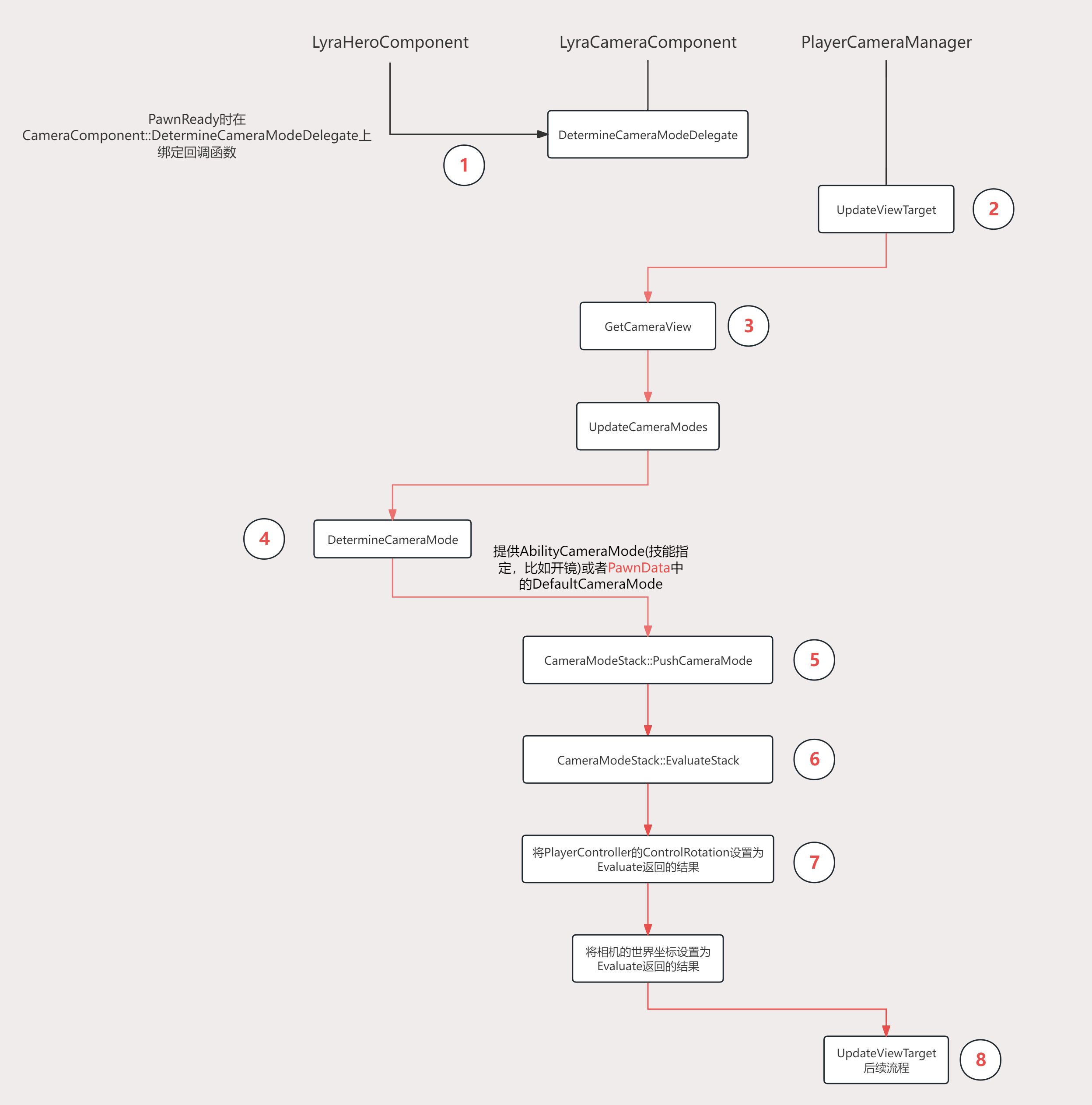
PawnReady的时候会设置Input, Ability,Camera相关的设置,这里只是注册了回调函数DetermineCameraMode,这个函数每帧会告诉LyraCameraComponent当前应该使用哪个CameraMode配置- 每帧更新相机
POV(PointofView)信息时都会从PlayerCameraManager::UpdateViewTarget开始 - 通过上面的CameraSystem流程图可以知道,POV的结果由角色身上
CameraComponent::GetCameraView函数返回 GetCameraView会调用到UpdateCameraModes- 这个函数会调用第1步时注册的代理函数,LyraCameraComponent就知道了这一帧要使用哪个CameraMode配置
- 第4步会返回CameraMode的Class, 这一步会
NewObject这个CameraMode(如果还没有创建过),并将这个实例放入CameraModeStack的栈顶 CameraModeStack内部可能有多个CameraMode, 这一步会遍历所有的CameraMode并得到每一个CameraMode返回的POV, 再结合每个CameraMode的BlendWeight计算最终的POV- 得到最终的POV后,将
PlayerController的ControlRotation设置为返回的ControlRotation,同样将 PlayerComponent的世界坐标设置为返回的结果,这样POV, ControlRotation和CameraComponent的Transform数据一致 - CameraSystem流程图中的后续流程,比如ViewTargetBlend等等。
APlayerCameraManager
1
2
3
4
5
6
| // 一个“玩家摄像机管理器”负责管理特定玩家的摄像机。
// 它定义了其他系统(例如渲染器)所使用的最终视图属性,这意味着你可以将其视为存在于世界中的虚拟眼球。
// 它可以直接计算最终的摄像机属性,也可以在其他影响摄像机的对象或角色之间进行仲裁/混合(例如从一个摄像机角色过渡到另一个)。
// 玩家摄像机管理器的主要外部职责是可靠地响应各种“获取*”函数,例如“获取摄像机视点”。其余的一切都是实现细节,可由用户项目进行重写。
// 默认情况下,一个玩家摄像机管理器会维护一个“视图目标”,即摄像机所关联的主要角色。
// 它还可以对最终视图状态应用各种“后置”效果,例如摄像机动画、抖动、后期处理效果或诸如镜头上的污渍之类的特殊效果。
|
1
2
3
4
5
6
7
8
9
10
11
12
13
14
15
16
17
18
19
20
21
22
23
| /**
* A PlayerCameraManager is responsible for managing the camera for a particular
* player. It defines the final view properties used by other systems (e.g. the renderer),
* meaning you can think of it as your virtual eyeball in the world. It can compute the
* final camera properties directly, or it can arbitrate/blend between other objects or
* actors that influence the camera (e.g. blending from one CameraActor to another).
*
* The PlayerCameraManagers primary external responsibility is to reliably respond to
* various Get*() functions, such as GetCameraViewPoint. Most everything else is
* implementation detail and overrideable by user projects.
*
* By default, a PlayerCameraManager maintains a "view target", which is the primary actor
* the camera is associated with. It can also apply various "post" effects to the final
* view state, such as camera animations, shakes, post-process effects or special
* effects such as dirt on the lens.
*
* @see https://docs.unrealengine.com/latest/INT/Gameplay/Framework/Camera/
*/
UCLASS(notplaceable, transient, BlueprintType, Blueprintable, Config=Engine, MinimalAPI)
class APlayerCameraManager : public AActor
{
// ......
}
|
这个类主要核心就在于它得UpdateViewTarget函数.在这函数中会去调用找到得相机组件得GetCameraView.这个就是我们介入得地方
1
2
3
4
5
| if (ACameraActor* CamActor = Cast<ACameraActor>(OutVT.Target))
{
// Viewing through a camera actor.
CamActor->GetCameraComponent()->GetCameraView(DeltaTime, OutVT.POV);
}
|
1
2
3
4
5
6
7
8
9
10
11
12
13
14
15
16
17
18
19
20
21
22
23
24
25
26
27
28
29
30
31
32
33
34
35
36
37
38
39
40
41
42
43
44
45
46
47
48
49
50
51
52
53
54
55
56
57
58
59
60
61
62
63
64
65
66
67
68
69
70
71
72
73
74
75
76
77
78
79
80
81
82
83
84
85
86
87
88
89
90
91
92
93
94
95
96
97
98
99
100
101
102
103
104
105
106
107
108
109
110
111
112
113
114
115
116
117
118
119
120
121
122
123
124
125
126
127
128
129
130
131
132
133
134
135
136
137
138
| void APlayerCameraManager::UpdateViewTarget(FTViewTarget& OutVT, float DeltaTime)
{
// Don't update outgoing viewtarget during an interpolation
// 在插值过程中不更新即将离开的视图目标
if ((PendingViewTarget.Target != NULL) && BlendParams.bLockOutgoing && OutVT.Equal(ViewTarget))
{
return;
}
// Store previous POV, in case we need it later
// 存储之前的POV(视角信息),以备后续使用
FMinimalViewInfo OrigPOV = OutVT.POV;
// Reset the view target POV fully
// 完全重置视图目标的POV(视角信息)
static const FMinimalViewInfo DefaultViewInfo;
OutVT.POV = DefaultViewInfo;
OutVT.POV.FOV = DefaultFOV; // 设置默认视野角度
OutVT.POV.OrthoWidth = DefaultOrthoWidth; // 设置正交投影宽度
OutVT.POV.AspectRatio = DefaultAspectRatio; // 设置屏幕宽高比
OutVT.POV.bConstrainAspectRatio = bDefaultConstrainAspectRatio; // 是否强制宽高比
OutVT.POV.ProjectionMode = bIsOrthographic ? ECameraProjectionMode::Orthographic : ECameraProjectionMode::Perspective; // 投影模式:正交/透视
OutVT.POV.PostProcessBlendWeight = 1.0f; // 后处理混合权重
OutVT.POV.bAutoCalculateOrthoPlanes = bAutoCalculateOrthoPlanes; // 是否自动计算正交平面
OutVT.POV.AutoPlaneShift = AutoPlaneShift; // 自动平面偏移量
OutVT.POV.bUpdateOrthoPlanes = bUpdateOrthoPlanes; // 是否更新正交平面
OutVT.POV.bUseCameraHeightAsViewTarget = bUseCameraHeightAsViewTarget; // 是否使用相机高度作为视图目标高度
bool bDoNotApplyModifiers = false; // 是否禁用相机修饰器(如震动、偏移等)
if (ACameraActor* CamActor = Cast<ACameraActor>(OutVT.Target))
{
// Viewing through a camera actor.
// 通过相机Actor观察(直接使用相机Actor的参数)
CamActor->GetCameraComponent()->GetCameraView(DeltaTime, OutVT.POV);
}
else
{
// 预定义相机样式名称常量
static const FName NAME_Fixed = FName(TEXT("Fixed")); // 固定视角
static const FName NAME_ThirdPerson = FName(TEXT("ThirdPerson")); // 第三人称视角
static const FName NAME_FreeCam = FName(TEXT("FreeCam")); // 自由相机
static const FName NAME_FreeCam_Default = FName(TEXT("FreeCam_Default")); // 默认自由相机
static const FName NAME_FirstPerson = FName(TEXT("FirstPerson")); // 第一人称视角
if (CameraStyle == NAME_Fixed)
{
// do not update, keep previous camera position by restoring
// saved POV, in case CalcCamera changes it but still returns false
// 固定视角模式:不更新视角,恢复之前保存的POV(防止CalcCamera修改但返回false)
OutVT.POV = OrigPOV;
// don't apply modifiers when using this debug camera mode
// 调试相机模式下不应用修饰器
bDoNotApplyModifiers = true;
}
else if (CameraStyle == NAME_ThirdPerson || CameraStyle == NAME_FreeCam || CameraStyle == NAME_FreeCam_Default)
{
// Simple third person view implementation
// 简单第三人称视角实现
FVector Loc = OutVT.Target->GetActorLocation(); // 获取目标Actor位置
FRotator Rotator = OutVT.Target->GetActorRotation(); // 获取目标Actor旋转
if (OutVT.Target == PCOwner)
{
// 如果目标是所属PlayerController,使用焦点位置(如玩家焦点)
Loc = PCOwner->GetFocalLocation();
}
// Take into account Mesh Translation so it takes into account the PostProcessing we do there.
// @fixme, can crash in certain BP cases where default mesh is null
// 考虑Mesh的平移(以适配后期处理)
// 注意:某些蓝图情况下默认Mesh为空可能导致崩溃,需修复
// APawn* TPawn = Cast<APawn>(OutVT.Target);
// if ((TPawn != NULL) && (TPawn->Mesh != NULL))
// {
// Loc += FQuatRotationMatrix(OutVT.Target->GetActorQuat()).TransformVector(TPawn->Mesh->RelativeLocation - GetDefault<APawn>(TPawn->GetClass())->Mesh->RelativeLocation);
// }
// OutVT.Target.GetActorEyesViewPoint(Loc, Rot);
if( CameraStyle == NAME_FreeCam || CameraStyle == NAME_FreeCam_Default )
{
// 自由相机模式下,使用PlayerController的控制旋转
Rotator = PCOwner->GetControlRotation();
}
// 计算相机位置:目标位置 + 偏移量 + 自由相机偏移 - 朝向向量 * 相机距离
FVector Pos = Loc + ViewTargetOffset + FRotationMatrix(Rotator).TransformVector(FreeCamOffset) - Rotator.Vector() * FreeCamDistance;
FCollisionQueryParams BoxParams(SCENE_QUERY_STAT(FreeCam), false, this); // 碰撞查询参数(用于相机碰撞检测)
BoxParams.AddIgnoredActor(OutVT.Target); // 忽略目标Actor(防止相机与自身碰撞)
FHitResult Result; // 碰撞检测结果
// 执行球形碰撞检测(从目标位置到相机位置)
GetWorld()->SweepSingleByChannel(Result, Loc, Pos, FQuat::Identity, ECC_Camera, FCollisionShape::MakeBox(FVector(12.f)), BoxParams);
// 根据碰撞结果设置相机位置:无碰撞则用计算位置,有碰撞则用碰撞点
OutVT.POV.Location = !Result.bBlockingHit ? Pos : Result.Location;
OutVT.POV.Rotation = Rotator; // 设置相机旋转
// don't apply modifiers when using this debug camera mode
// 调试相机模式下不应用修饰器
bDoNotApplyModifiers = true;
}
else if (CameraStyle == NAME_FirstPerson)
{
// Simple first person, view through viewtarget's 'eyes'
// 简单第一人称视角:使用目标Actor的眼睛位置和旋转
OutVT.Target->GetActorEyesViewPoint(OutVT.POV.Location, OutVT.POV.Rotation);
// don't apply modifiers when using this debug camera mode
// 调试相机模式下不应用修饰器
bDoNotApplyModifiers = true;
}
else
{
// 自定义相机模式:调用内部更新逻辑
UpdateViewTargetInternal(OutVT, DeltaTime);
}
}
// 应用相机修饰器(如震动、镜头畸变等),除非禁用或强制启用
if (!bDoNotApplyModifiers || bAlwaysApplyModifiers)
{
// Apply camera modifiers at the end (view shakes for example)
// 最后应用相机修饰器(例如视图震动效果)
ApplyCameraModifiers(DeltaTime, OutVT.POV);
}
// Synchronize the actor with the view target results
// 将相机Actor的位置/旋转同步到最终POV结果
SetActorLocationAndRotation(OutVT.POV.Location, OutVT.POV.Rotation, false);
if (bAutoCalculateOrthoPlanes && OutVT.Target)
{
// 自动计算正交平面时,设置相机到目标的距离
OutVT.POV.SetCameraToViewTarget(OutVT.Target->GetActorLocation());
}
// 更新相机镜头特效(如景深、光晕等)
UpdateCameraLensEffects(OutVT);
}
|
ALyraPlayerCameraManager
这个类基本无作用.除了给了一个用于拓展UI相机下得处理.
1
2
3
4
5
6
7
8
9
10
11
| ALyraPlayerController::ALyraPlayerController(const FObjectInitializer& ObjectInitializer)
: Super(ObjectInitializer)
{
// 指定相机管理类
PlayerCameraManagerClass = ALyraPlayerCameraManager::StaticClass();
#if USING_CHEAT_MANAGER
// 指定作弊器的类
CheatClass = ULyraCheatManager::StaticClass();
#endif // #if USING_CHEAT_MANAGER
}
|
1
2
3
4
5
6
7
8
9
| ALyraPlayerCameraManager::ALyraPlayerCameraManager(const FObjectInitializer& ObjectInitializer)
: Super(ObjectInitializer)
{
DefaultFOV = LYRA_CAMERA_DEFAULT_FOV;
ViewPitchMin = LYRA_CAMERA_DEFAULT_PITCH_MIN;
ViewPitchMax = LYRA_CAMERA_DEFAULT_PITCH_MAX;
UICamera = CreateDefaultSubobject<ULyraUICameraManagerComponent>(UICameraComponentName);
}
|
1
2
3
4
5
6
7
8
9
10
11
12
13
| void ALyraPlayerCameraManager::UpdateViewTarget(FTViewTarget& OutVT, float DeltaTime)
{
// If the UI Camera is looking at something, let it have priority.
// 如果用户界面摄像机正在拍摄某个对象,那就让它拥有优先权。
if (UICamera->NeedsToUpdateViewTarget())
{
Super::UpdateViewTarget(OutVT, DeltaTime);
UICamera->UpdateViewTarget(OutVT, DeltaTime);
return;
}
Super::UpdateViewTarget(OutVT, DeltaTime);
}
|
代码
1
2
3
4
5
6
7
8
9
10
11
12
13
14
15
16
17
18
19
20
21
22
23
24
25
26
27
28
29
30
31
32
33
34
| /**
* ALyraPlayerCameraManager
*
* The base player camera manager class used by this project.
* 本项目所使用的基础玩家摄像机管理类。
*/
UCLASS(notplaceable, MinimalAPI)
class ALyraPlayerCameraManager : public APlayerCameraManager
{
GENERATED_BODY()
public:
// 构造函数 初始化成员变量
ALyraPlayerCameraManager(const FObjectInitializer& ObjectInitializer);
// 获取UI相机管理组件
ULyraUICameraManagerComponent* GetUICameraComponent() const;
protected:
// 根据给定的目标视点计算出新的视角位置。
// 可以关注一下它的父类调用
// 这里主要是嵌入UI相机管理
virtual void UpdateViewTarget(FTViewTarget& OutVT, float DeltaTime) override;
// 转发给相机 绘制调试信息
virtual void DisplayDebug(UCanvas* Canvas, const FDebugDisplayInfo& DebugDisplay, float& YL, float& YPos) override;
private:
/** The UI Camera Component, controls the camera when UI is doing something important that gameplay doesn't get priority over. */
/** 该 UI 摄像头组件用于在游戏玩法无法优先处理某些重要事项时控制摄像机。*/
UPROPERTY(Transient)
TObjectPtr<ULyraUICameraManagerComponent> UICamera;
};
|
ULyraUICameraManagerComponent
没啥作用.可以略过.
1
2
3
4
5
6
7
8
9
10
11
12
13
14
15
16
17
18
19
20
21
22
23
24
25
26
27
28
29
30
31
32
33
34
35
36
37
38
| UCLASS( Transient, Within=LyraPlayerCameraManager )
class ULyraUICameraManagerComponent : public UActorComponent
{
GENERATED_BODY()
public:
// 获取UI相机管理组件
static ULyraUICameraManagerComponent* GetComponent(APlayerController* PC);
public:
// 构造函数 注入回调的钩子
ULyraUICameraManagerComponent();
// 无作用
virtual void InitializeComponent() override;
// 是否正在设置视角Actor
bool IsSettingViewTarget() const { return bUpdatingViewTarget; }
// 获取视角对象
AActor* GetViewTarget() const { return ViewTarget; }
// 重新设置一个视角对象
void SetViewTarget(AActor* InViewTarget, FViewTargetTransitionParams TransitionParams = FViewTargetTransitionParams());
// 是否需要更新视角对象
bool NeedsToUpdateViewTarget() const;
// 无
// 嵌入到相机管理组件 可以修改特定需要的视角
void UpdateViewTarget(struct FTViewTarget& OutVT, float DeltaTime);
// 无
void OnShowDebugInfo(AHUD* HUD, UCanvas* Canvas, const FDebugDisplayInfo& DisplayInfo, float& YL, float& YPos);
private:
UPROPERTY(Transient)
TObjectPtr<AActor> ViewTarget;
UPROPERTY(Transient)
bool bUpdatingViewTarget;
};
|
相机模式
模式之间过渡的枚举
1
2
3
4
5
6
7
8
9
10
11
12
13
14
15
16
17
18
19
20
21
22
23
24
25
26
27
| /**
* ELyraCameraModeBlendFunction
*
* Blend function used for transitioning between camera modes.
* 用于在相机模式之间过渡的混合函数。
*/
UENUM(BlueprintType)
enum class ELyraCameraModeBlendFunction : uint8
{
// Does a simple linear interpolation.
// 进行简单的线性插值。
Linear,
// Immediately accelerates, but smoothly decelerates into the target. Ease amount controlled by the exponent.
// 立即加速,但会平稳地减速直至抵达目标位置。减速幅度由指数值控制。
EaseIn,
// Smoothly accelerates, but does not decelerate into the target. Ease amount controlled by the exponent.
// 以平稳的方式加速,但不会减速直至抵达目标位置。减速幅度由指数值控制。
EaseOut,
// Smoothly accelerates and decelerates. Ease amount controlled by the exponent.
// 能平稳地加速和减速。减速幅度由指数值控制。
EaseInOut,
COUNT UMETA(Hidden)
};
|
相机模式传递的数据
1
2
3
4
5
6
7
8
9
10
11
12
13
14
15
16
17
18
19
20
21
22
23
24
25
26
27
28
29
30
| /**
* FLyraCameraModeView
*
* View data produced by the camera mode that is used to blend camera modes.
* 查看由用于混合不同拍摄模式的相机模式所生成的数据。
*
*/
struct FLyraCameraModeView
{
public:
FLyraCameraModeView();
// 将自己与其他的相机模式混合数据进行混合
void Blend(const FLyraCameraModeView& Other, float OtherWeight);
public:
// 位置
FVector Location;
// 旋转
FRotator Rotation;
// 控制旋转
FRotator ControlRotation;
// FOV
float FieldOfView;
};
|
这里需要注意下混合的时候,数据的插值处理
1
2
3
4
5
6
7
8
9
10
11
12
13
14
15
16
17
18
19
20
21
22
23
24
25
26
| void FLyraCameraModeView::Blend(const FLyraCameraModeView& Other, float OtherWeight)
{
if (OtherWeight <= 0.0f)
{
// 负数或者0 还没开始混入
return;
}
else if (OtherWeight >= 1.0f)
{
// 大于等于1.0 直接赋值即可
*this = Other;
return;
}
// 插值.
Location = FMath::Lerp(Location, Other.Location, OtherWeight);
const FRotator DeltaRotation = (Other.Rotation - Rotation).GetNormalized();
Rotation = Rotation + (OtherWeight * DeltaRotation);
const FRotator DeltaControlRotation = (Other.ControlRotation - ControlRotation).GetNormalized();
ControlRotation = ControlRotation + (OtherWeight * DeltaControlRotation);
FieldOfView = FMath::Lerp(FieldOfView, Other.FieldOfView, OtherWeight);
}
|
相机模式的定义
构造函数
1
2
3
4
5
6
7
8
9
10
11
12
| ULyraCameraMode::ULyraCameraMode()
{
FieldOfView = LYRA_CAMERA_DEFAULT_FOV;
ViewPitchMin = LYRA_CAMERA_DEFAULT_PITCH_MIN;
ViewPitchMax = LYRA_CAMERA_DEFAULT_PITCH_MAX;
BlendTime = 0.5f;
BlendFunction = ELyraCameraModeBlendFunction::EaseOut;
BlendExponent = 4.0f;
BlendAlpha = 1.0f;
BlendWeight = 1.0f;
}
|
工具函数
1
2
3
4
5
6
7
8
9
10
11
12
13
14
15
16
17
18
19
20
21
| // 获取相机组件 通过Outer去获取
UE_API ULyraCameraComponent* GetLyraCameraComponent() const;
// 获取世界
UE_API virtual UWorld* GetWorld() const override;
// 获取持有这个相机模式的Actor
UE_API AActor* GetTargetActor() const;
// 获取相机模式的视角数据
const FLyraCameraModeView& GetCameraModeView() const { return View; }
// Called when this camera mode is activated on the camera mode stack.
// 当此相机模式在相机模式栈中被激活时触发此事件。
virtual void OnActivation() {};
// Called when this camera mode is deactivated on the camera mode stack.
// 当此相机模式在相机模式栈中被停用时触发此事件。
virtual void OnDeactivation() {};
// ....
|
核心函数
相机模式的核心在于持有视角数据,并且每帧跟新角色数据,生成最新的相机数据以供上层使用!
UpdateCameraMode
1
2
3
4
5
| void ULyraCameraMode::UpdateCameraMode(float DeltaTime)
{
UpdateView(DeltaTime);
UpdateBlending(DeltaTime);
}
|
UpdateView
1
2
3
4
5
6
7
8
9
10
11
12
13
| void ULyraCameraMode::UpdateView(float DeltaTime)
{
FVector PivotLocation = GetPivotLocation();
FRotator PivotRotation = GetPivotRotation();
// 限制Y轴的大小值 ,避免在竖向转过头了
PivotRotation.Pitch = FMath::ClampAngle(PivotRotation.Pitch, ViewPitchMin, ViewPitchMax);
View.Location = PivotLocation;
View.Rotation = PivotRotation;
View.ControlRotation = View.Rotation;
View.FieldOfView = FieldOfView;
}
|
UpdateBlending
1
2
3
4
5
6
7
8
9
10
11
12
13
14
15
16
17
18
19
20
21
22
23
24
25
26
27
28
29
30
31
32
33
34
35
36
37
38
39
40
41
| void ULyraCameraMode::UpdateBlending(float DeltaTime)
{
// 混合的时间应该是大于0的 否则就立刻混合完成
if (BlendTime > 0.0f)
{
// 不断累积每帧加入的混合时间的程度
BlendAlpha += (DeltaTime / BlendTime);
// 但是这个程度最高为1 即混合完毕
BlendAlpha = FMath::Min(BlendAlpha, 1.0f);
}
else
{
BlendAlpha = 1.0f;
}
// 混合的速度
const float Exponent = (BlendExponent > 0.0f) ? BlendExponent : 1.0f;
switch (BlendFunction)
{
// 如果是线性的 这个Alpha值就直接是混合权重
case ELyraCameraModeBlendFunction::Linear:
BlendWeight = BlendAlpha;
break;
case ELyraCameraModeBlendFunction::EaseIn:
BlendWeight = FMath::InterpEaseIn(0.0f, 1.0f, BlendAlpha, Exponent);
break;
case ELyraCameraModeBlendFunction::EaseOut:
BlendWeight = FMath::InterpEaseOut(0.0f, 1.0f, BlendAlpha, Exponent);
break;
case ELyraCameraModeBlendFunction::EaseInOut:
BlendWeight = FMath::InterpEaseInOut(0.0f, 1.0f, BlendAlpha, Exponent);
break;
default:
checkf(false, TEXT("UpdateBlending: Invalid BlendFunction [%d]\n"), (uint8)BlendFunction);
break;
}
}
|
蹲伏的调整
1
2
3
4
5
6
7
8
9
10
11
12
13
14
15
16
17
18
19
20
21
22
23
24
25
26
27
28
29
30
31
32
33
| FVector ULyraCameraMode::GetPivotLocation() const
{
const AActor* TargetActor = GetTargetActor();
check(TargetActor);
if (const APawn* TargetPawn = Cast<APawn>(TargetActor))
{
// Height adjustments for characters to account for crouching.
// 对角色的高度进行调整,以适应其蹲伏的动作。
if (const ACharacter* TargetCharacter = Cast<ACharacter>(TargetPawn))
{
const ACharacter* TargetCharacterCDO = TargetCharacter->GetClass()->GetDefaultObject<ACharacter>();
check(TargetCharacterCDO);
const UCapsuleComponent* CapsuleComp = TargetCharacter->GetCapsuleComponent();
check(CapsuleComp);
const UCapsuleComponent* CapsuleCompCDO = TargetCharacterCDO->GetCapsuleComponent();
check(CapsuleCompCDO);
const float DefaultHalfHeight = CapsuleCompCDO->GetUnscaledCapsuleHalfHeight();
const float ActualHalfHeight = CapsuleComp->GetUnscaledCapsuleHalfHeight();
// 蹲下时调高相机位置 避免视角突然下沉
const float HeightAdjustment = (DefaultHalfHeight - ActualHalfHeight) + TargetCharacterCDO->BaseEyeHeight;
return TargetCharacter->GetActorLocation() + (FVector::UpVector * HeightAdjustment);
}
return TargetPawn->GetPawnViewLocation();
}
return TargetActor->GetActorLocation();
}
|
代码
1
2
3
4
5
6
7
8
9
10
11
12
13
14
15
16
17
18
19
20
21
22
23
24
25
26
27
28
29
30
31
32
33
34
35
36
37
38
39
40
41
42
43
44
45
46
47
48
49
50
51
52
53
54
55
56
57
58
59
60
61
62
63
64
65
66
67
68
69
70
71
72
73
74
75
76
77
78
79
80
81
82
83
84
85
86
87
88
89
90
91
92
93
94
95
96
97
98
99
100
101
102
103
104
105
106
107
108
109
110
111
112
113
114
115
116
117
118
119
120
121
122
123
124
125
| /**
* ULyraCameraMode
*
* Base class for all camera modes.
* 所有相机模式的基类。
*/
UCLASS(MinimalAPI, Abstract, NotBlueprintable)
class ULyraCameraMode : public UObject
{
GENERATED_BODY()
public:
// 构造函数 初始化成员变量
UE_API ULyraCameraMode();
// 获取相机组件 通过Outer去获取
UE_API ULyraCameraComponent* GetLyraCameraComponent() const;
// 获取世界
UE_API virtual UWorld* GetWorld() const override;
// 获取持有这个相机模式的Actor
UE_API AActor* GetTargetActor() const;
// 获取相机模式的视角数据
const FLyraCameraModeView& GetCameraModeView() const { return View; }
// Called when this camera mode is activated on the camera mode stack.
// 当此相机模式在相机模式栈中被激活时触发此事件。
virtual void OnActivation() {};
// Called when this camera mode is deactivated on the camera mode stack.
// 当此相机模式在相机模式栈中被停用时触发此事件。
virtual void OnDeactivation() {};
// 更新相机模式
UE_API void UpdateCameraMode(float DeltaTime);
// 获取混合时间
float GetBlendTime() const { return BlendTime; }
// 获取混合权重
float GetBlendWeight() const { return BlendWeight; }
// 设置混合权重 需要根据当前相机的混合模式为设置
// 外部调用 调整相机模式时使用
// 正常是由Tick更新
UE_API void SetBlendWeight(float Weight);
// 获取到相机模式的tag
FGameplayTag GetCameraTypeTag() const
{
return CameraTypeTag;
}
// 绘制调试信息 由相机容器调用
UE_API virtual void DrawDebug(UCanvas* Canvas) const;
protected:
// 获取到相机的位置 考虑到蹲伏时胶囊提会发生变化
UE_API virtual FVector GetPivotLocation() const;
// 获取到相机的旋转
UE_API virtual FRotator GetPivotRotation() const;
// 更新视角数据
UE_API virtual void UpdateView(float DeltaTime);
// 更新混合数据
UE_API virtual void UpdateBlending(float DeltaTime);
protected:
// A tag that can be queried by gameplay code that cares when a kind of camera mode is active
// without having to ask about a specific mode (e.g., when aiming downsights to get more accuracy)
// 一个标签,可通过游戏代码进行查询,该代码能够了解某种摄像模式是否处于激活状态
// 无需专门询问某一特定模式(例如,在瞄准时降低视角以提高准确性时)
UPROPERTY(EditDefaultsOnly, Category = "Blending")
FGameplayTag CameraTypeTag;
// View output produced by the camera mode.
// 查看由相机模式生成的输出内容。
FLyraCameraModeView View;
// The horizontal field of view (in degrees).
// 水平视角范围(以度为单位)
UPROPERTY(EditDefaultsOnly, Category = "View", Meta = (UIMin = "5.0", UIMax = "170", ClampMin = "5.0", ClampMax = "170.0"))
float FieldOfView;
// Minimum view pitch (in degrees).
// 最小视角倾斜度(以度为单位)
UPROPERTY(EditDefaultsOnly, Category = "View", Meta = (UIMin = "-89.9", UIMax = "89.9", ClampMin = "-89.9", ClampMax = "89.9"))
float ViewPitchMin;
// Maximum view pitch (in degrees).
// 最大视角仰角(以度为单位)
UPROPERTY(EditDefaultsOnly, Category = "View", Meta = (UIMin = "-89.9", UIMax = "89.9", ClampMin = "-89.9", ClampMax = "89.9"))
float ViewPitchMax;
// How long it takes to blend in this mode.
// 在这种模式下完成混合所需的时间是多久。
UPROPERTY(EditDefaultsOnly, Category = "Blending")
float BlendTime;
// Function used for blending.
// 用于混合的函数。
UPROPERTY(EditDefaultsOnly, Category = "Blending")
ELyraCameraModeBlendFunction BlendFunction;
// Exponent used by blend functions to control the shape of the curve.
// 用于控制曲线形状的混合函数所使用的指数值。
UPROPERTY(EditDefaultsOnly, Category = "Blending")
float BlendExponent;
// Linear blend alpha used to determine the blend weight.
// 使用线性混合透明度来确定混合权重。
float BlendAlpha;
// Blend weight calculated using the blend alpha and function.
// 利用混合透明度和函数计算混合权重。
float BlendWeight;
protected:
/** If true, skips all interpolation and puts camera in ideal location. Automatically set to false next frame. */
/** 若为真,则跳过所有插值操作,并将摄像机置于理想位置。该设置会自动在下一帧变为假。*/
// 子类拓展使用
UPROPERTY(transient)
uint32 bResetInterpolation:1;
};
|
相机模式的容器
混合权重过程
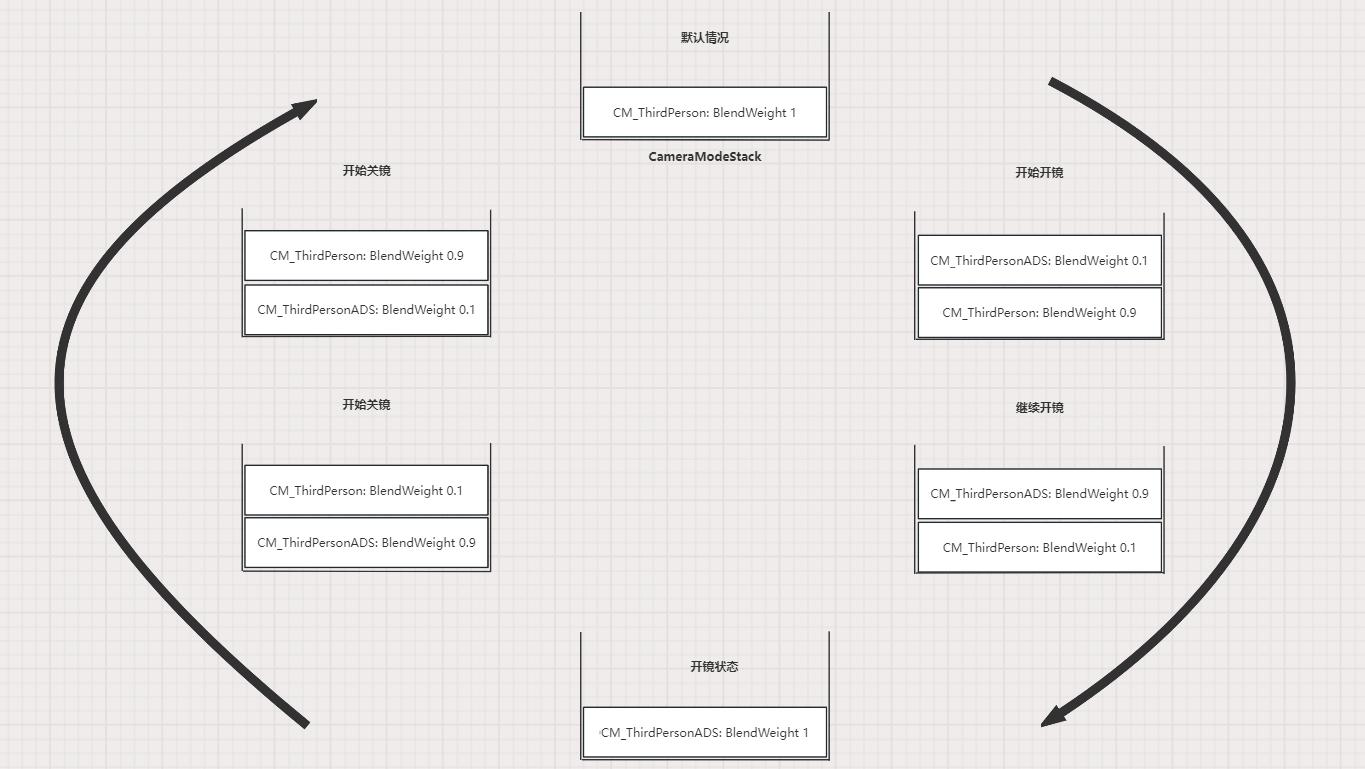
以第三人称角色开镜举例, 流程图如下:
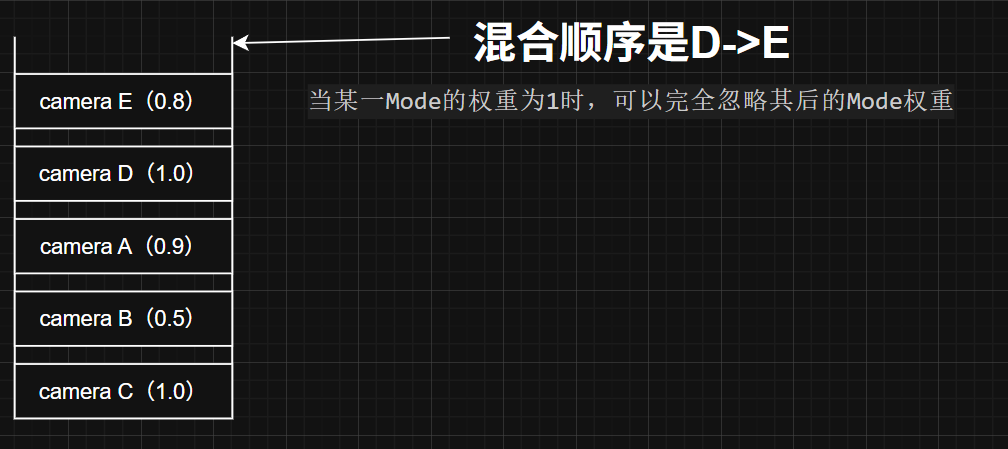
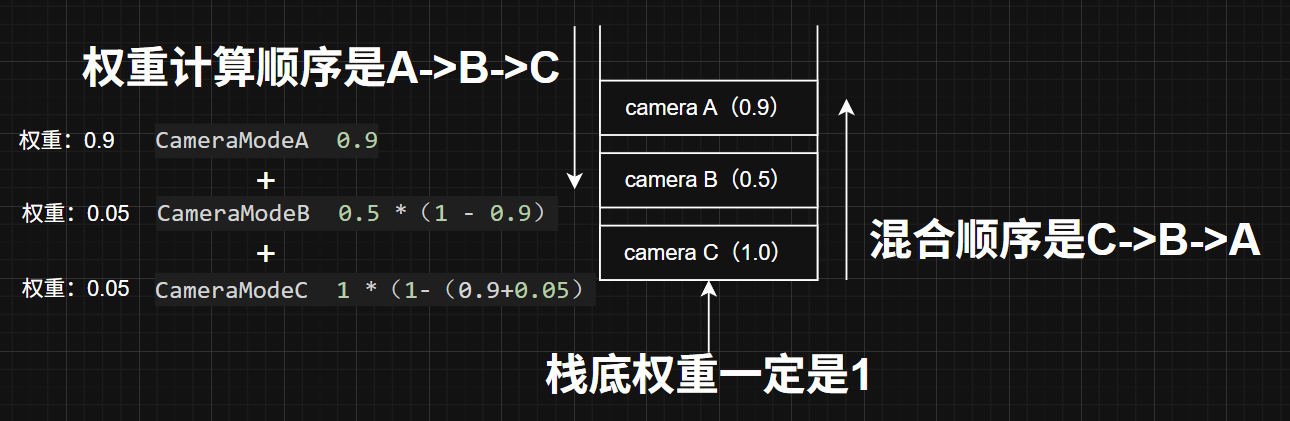
这里计算混合权重为累乘计算,假设Mode栈如下
1
2
3
4
5
6
7
| CameraModeA - 0.9
CameraModeB - 0.5
CameraModeC - 1(栈底的权重一定为1)
最后权重
(CameraModeC * 1) * (1 - 0.5) + CameraModeB * 0.5) * (1 - 0.9) + CameraModeA * 0.9
=
CameraModeC * 0.05 + CameraModeB * 0.05 + CameraModeA * 0.9
|
反推回去,如果要将CameraModeC提至栈顶,权重 1 * (1 - 0.9) * (1 - 0.5) = 0.05 此时,Mode栈更新为
1
2
3
4
5
6
7
| CameraModeC - 0.05
CameraModeA - 0.9
CameraModeB - 1(栈底的权重一定为1)
最后权重
((CameraModeB * 1) * (1 - 0.9) + CameraModeA * 0.9) * (1 - 0.05) + CameraModeC * 0.05
=
CameraModeC * 0.05 + CameraModeA * 0.855 + CameraModeB * 0.195
|
这样做的优点:
- 当某一Mode的权重为1时,可以完全忽略其后的Mode权重
ULyraCameraModeStack中维护了一个CameraMode栈,每帧Push外部指定的CameraMode类(压到栈顶或从栈中提上来)。- 再调用这些
CameraMode->UpdateCameraMode(DeltaTime)更新权重。 - 最后依次调用
CameraMode->GetCameraModeView()并混合。
期间还会调用CameraMode的生命周期函数
推入新的相机模式
1
2
3
4
5
6
7
8
9
10
11
12
13
14
15
16
17
18
19
20
21
22
23
24
25
26
27
28
29
30
31
32
33
34
35
36
37
38
39
40
41
42
43
44
45
46
47
48
49
50
51
52
53
54
55
56
57
58
59
60
61
62
63
64
65
66
67
68
69
70
71
72
73
74
75
76
77
78
79
80
81
82
83
84
85
86
87
88
89
90
91
92
93
94
95
96
97
98
99
100
101
102
| void ULyraCameraModeStack::PushCameraMode(TSubclassOf<ULyraCameraMode> CameraModeClass)
{
// 空的话就跳过
if (!CameraModeClass)
{
return;
}
// 从对象池子里面取一个出来
ULyraCameraMode* CameraMode = GetCameraModeInstance(CameraModeClass);
check(CameraMode);
int32 StackSize = CameraModeStack.Num();
// 当前的栈的顶部已经是我们推送进来的这个相机模式了.
if ((StackSize > 0) && (CameraModeStack[0] == CameraMode))
{
// Already top of stack.
// 已位于栈顶。
return;
}
// See if it's already in the stack and remove it.
// Figure out how much it was contributing to the stack.
// 检查它是否已在栈中,若已存在则将其移除。
// 确定它对栈的贡献量是多少。
int32 ExistingStackIndex = INDEX_NONE;
float ExistingStackContribution = 1.0f;
// 这个地方是本章的难点!!!!最好画图去理解.
// 注意我们混合的时候 是从栈底开始向栈顶混合
// 新添加的 相机模式最后混合!
/*
* 栈顶->栈底 括号内为相机模式自身 的混合权重 每帧都在增加 大于1.0 之后 会得下部的相机模式无效化 被移除
* A(0.3) B(0.7) C(0.2) D(1.0) E(1.1)
* 栈贡献(权重) 0.3 0.49 0.042 0.168 0
* 我们混合的顺序是 D->C>->B->A
*/
for (int32 StackIndex = 0; StackIndex < StackSize; ++StackIndex)
{
if (CameraModeStack[StackIndex] == CameraMode)
{
ExistingStackIndex = StackIndex;
// 记录当前自己这个相机模式使用的权重
// 其实这里的CameraMode携程CameraModeStack[StackIndex] 更好理解
// 意思当前这个index对相机栈的贡献
ExistingStackContribution *= CameraMode->GetBlendWeight();
break;
}
else
{
// 扣除已经使用掉的权重
// 在剩下的栈权重中扣除本次使用掉的权重
ExistingStackContribution *= (1.0f - CameraModeStack[StackIndex]->GetBlendWeight());
}
}
if (ExistingStackIndex != INDEX_NONE)
{
// 将我们找到的这个相机模式提取出来
// 这样后续我们使用的时候,可以保证这个相机模式的当前栈贡献一致
CameraModeStack.RemoveAt(ExistingStackIndex);
StackSize--;
}
else
{
// 因为没有 所以我们这个新的相机模式目前的栈贡献为0
ExistingStackContribution = 0.0f;
}
// Decide what initial weight to start with.
// 确定初始权重应设定为多少。
// 如果这个新的相机模式本身由混合的时间,并且栈里面有其他的相机模式,所以它就需要混合
const bool bShouldBlend = ((CameraMode->GetBlendTime() > 0.0f) && (StackSize > 0));
// 如果需要混合,那么混合的权重有两种情况,
// 1.如果它没有在栈中,那就是权重0.0,我们需要逐步加深这个权重值在UpdateStack里面.
// 2.如果它在栈中,那就需要调整它在栈中的位置,并获取它的权重值作为初始值,先移除,再添加到栈顶.
// 如果不需要混合,那么直接权重就是1.0,直接过渡过去即可.
const float BlendWeight = (bShouldBlend ? ExistingStackContribution : 1.0f);
CameraMode->SetBlendWeight(BlendWeight);
// Add new entry to top of stack.
// 将新条目添加至栈顶。
CameraModeStack.Insert(CameraMode, 0);
// Make sure stack bottom is always weighted 100%.
// 确保栈底的重量始终保持 100%。
CameraModeStack.Last()->SetBlendWeight(1.0f);
// Let the camera mode know if it's being added to the stack.
// 让相机模式知晓它是否被添加到堆栈中。
if (ExistingStackIndex == INDEX_NONE)
{
CameraMode->OnActivation();
}
}
|
调用位置
1
2
3
4
5
6
7
8
9
10
11
12
13
14
15
| void ULyraCameraComponent::UpdateCameraModes()
{
check(CameraModeStack);
if (CameraModeStack->IsStackActivate())
{
if (DetermineCameraModeDelegate.IsBound())
{
if (const TSubclassOf<ULyraCameraMode> CameraMode = DetermineCameraModeDelegate.Execute())
{
CameraModeStack->PushCameraMode(CameraMode);
}
}
}
}
|
评估相机的栈
EvaluateStack
1
2
3
4
5
| // 评估相机的栈
// 移除已经被使用完毕的相机混入模式
// 获取最终的相机模式混入数据
// 由相机组件调用
bool EvaluateStack(float DeltaTime, FLyraCameraModeView& OutCameraModeView);
|
1
2
3
4
5
6
7
8
9
10
11
12
13
14
| bool ULyraCameraModeStack::EvaluateStack(float DeltaTime, FLyraCameraModeView& OutCameraModeView)
{
if (!bIsActive)
{
return false;
}
// 处理不需要再混入的旧的相机模式,他们都是栈底的.
UpdateStack(DeltaTime);
// 获取相机模式的视角数据
BlendStack(OutCameraModeView);
return true;
}
|
1
2
3
4
5
6
| // 内部功能实现函数 由EvaluateStack调用
// 更新相机模式的栈容器权重
void UpdateStack(float DeltaTime);
// 内部功能实现函数 由EvaluateStack调用
// 获取最终混合的相机视角效果
void BlendStack(FLyraCameraModeView& OutCameraModeView) const;
|
UpdateStack
1
2
3
4
5
6
7
8
9
10
11
12
13
14
15
16
17
18
19
20
21
22
23
24
25
26
27
28
29
30
31
32
33
34
35
36
37
38
39
40
41
42
43
44
45
46
47
| void ULyraCameraModeStack::UpdateStack(float DeltaTime)
{
const int32 StackSize = CameraModeStack.Num();
// 空的就直接跳过
if (StackSize <= 0)
{
return;
}
int32 RemoveCount = 0;
int32 RemoveIndex = INDEX_NONE;
// 从栈顶开始计算
for (int32 StackIndex = 0; StackIndex < StackSize; ++StackIndex)
{
ULyraCameraMode* CameraMode = CameraModeStack[StackIndex];
check(CameraMode);
// 更新当前index的相机模式, 它会自己刷新提供的View和Weight
CameraMode->UpdateCameraMode(DeltaTime);
// 一旦这个相机模式的混入权重到达1.0之后.以这个相机模式之后其他相机模式都需要删掉.
if (CameraMode->GetBlendWeight() >= 1.0f)
{
// Everything below this mode is now irrelevant and can be removed.
// 从此模式之后的所有内容都已不再重要,可以删除了。
RemoveIndex = (StackIndex + 1);
RemoveCount = (StackSize - RemoveIndex);
break;
}
}
if (RemoveCount > 0)
{
// Let the camera modes know they being removed from the stack.
// 让相机模式知晓它们已被从堆栈中移除。
for (int32 StackIndex = RemoveIndex; StackIndex < StackSize; ++StackIndex)
{
ULyraCameraMode* CameraMode = CameraModeStack[StackIndex];
check(CameraMode);
CameraMode->OnDeactivation();
}
CameraModeStack.RemoveAt(RemoveIndex, RemoveCount);
}
}
|
BlendStack
1
2
3
4
5
6
7
8
9
10
11
12
13
14
15
16
17
18
19
20
21
22
23
24
25
26
27
28
29
30
31
| void ULyraCameraModeStack::BlendStack(FLyraCameraModeView& OutCameraModeView) const
{
const int32 StackSize = CameraModeStack.Num();
// 空的就跳过
if (StackSize <= 0)
{
return;
}
// Start at the bottom and blend up the stack
// 从底部开始,将各层逐渐融合在一起
// 这里获取的是最底部的
// 最底部的也就是最老的,最旧的,最稳定的.
// 新的添加在栈顶,还没完全生效
// 注意这里的最稳定的这个概念
const ULyraCameraMode* CameraMode = CameraModeStack[StackSize - 1];
check(CameraMode);
OutCameraModeView = CameraMode->GetCameraModeView();
// 从倒算第二个开始混入,因为倒数第一个已经列入混入的初始值
for (int32 StackIndex = (StackSize - 2); StackIndex >= 0; --StackIndex)
{
// 注意这里的指针调整指向了
// 其实为了便于理解 应当重新申请一个指针 但会增大开销.
CameraMode = CameraModeStack[StackIndex];
check(CameraMode);
OutCameraModeView.Blend(CameraMode->GetCameraModeView(), CameraMode->GetBlendWeight());
}
}
|
获取当前相机模式的混合情况
1
2
3
4
5
6
7
8
9
10
11
12
13
14
15
16
17
18
19
20
21
22
23
24
25
26
27
| void ULyraCameraModeStack::GetBlendInfo(float& OutWeightOfTopLayer, FGameplayTag& OutTagOfTopLayer) const
{
if (CameraModeStack.Num() == 0)
{
// 证明当前无相机模式
OutWeightOfTopLayer = 1.0f;
OutTagOfTopLayer = FGameplayTag();
return;
}
else
{
// 这个地方理解会有歧义.
// 获取是最底部的,最稳定的,最老的这个相机模式.
// 不可以理解成 最新添加的这个概念!!!!!!!!!!!!
// 不可以理解成 最新添加的这个概念!!!!!!!!!!!!
// 不可以理解成 最新添加的这个概念!!!!!!!!!!!!
// 因为最新添加的相机模式 一般是混入权重是0,然后它在栈顶,逐步增加混入权重到1.0
// 在这个过程中,栈底的老的相机模式还在生效,所以外部获取时应该获取基本盘.直到新的完全生效,老的被移除!!!!!
// 这里是Last其实是栈的底部,就是我们的基本盘!!!!
ULyraCameraMode* TopEntry = CameraModeStack.Last();
check(TopEntry);
OutWeightOfTopLayer = TopEntry->GetBlendWeight();
OutTagOfTopLayer = TopEntry->GetCameraTypeTag();
}
}
|
代码
1
2
3
4
5
6
7
8
9
10
11
12
13
14
15
16
17
18
19
20
21
22
23
24
25
26
27
28
29
30
31
32
33
34
35
36
37
38
39
40
41
42
43
44
45
46
47
48
49
50
51
52
53
54
55
56
57
58
59
60
61
62
63
64
65
| /**
* ULyraCameraModeStack
*
* Stack used for blending camera modes.
* 用于切换相机模式的堆栈功能。
* 注意,这里不要按照堆或者栈的思想去了解,就当成一个特殊的容器就行.要不然会很奇怪.
*/
UCLASS()
class ULyraCameraModeStack : public UObject
{
GENERATED_BODY()
public:
// 构造函数 默认激活自己的功能 避免重复激活
ULyraCameraModeStack();
// 激活 转发给相机模式 触发激活函数
void ActivateStack();
// 取消激活 通知相机模式它们正在被停用。
void DeactivateStack();
// 当前相机容器是否激活
bool IsStackActivate() const { return bIsActive; }
// 将一个新的相机模式的类推送过来,进行实例化,注意内部会去重.
void PushCameraMode(TSubclassOf<ULyraCameraMode> CameraModeClass);
// 评估相机的栈
// 移除已经被使用完毕的相机混入模式
// 获取最终的相机模式混入数据
// 由相机组件调用
bool EvaluateStack(float DeltaTime, FLyraCameraModeView& OutCameraModeView);
// 绘制相机调试信息
void DrawDebug(UCanvas* Canvas) const;
// Gets the tag associated with the top layer and the blend weight of it
// 获取顶层所关联的标签及其混合权重
void GetBlendInfo(float& OutWeightOfTopLayer, FGameplayTag& OutTagOfTopLayer) const;
protected:
// 获取相机模式的实例
// 对象池
ULyraCameraMode* GetCameraModeInstance(TSubclassOf<ULyraCameraMode> CameraModeClass);
// 内部功能实现函数 由EvaluateStack调用
// 更新相机模式的栈容器权重
void UpdateStack(float DeltaTime);
// 内部功能实现函数 由EvaluateStack调用
// 获取最终混合的相机视角效果
void BlendStack(FLyraCameraModeView& OutCameraModeView) const;
protected:
bool bIsActive;
// 相机模式的对象池子 避免重复重建
UPROPERTY()
TArray<TObjectPtr<ULyraCameraMode>> CameraModeInstances;
// 相机模式的容器,正在使用的对象们
UPROPERTY()
TArray<TObjectPtr<ULyraCameraMode>> CameraModeStack;
};
|
相机组件
每帧刷新相机情况
1
2
3
4
5
6
7
8
9
10
11
12
13
14
15
16
17
18
19
20
21
22
23
24
25
26
27
28
29
30
31
32
33
34
35
36
37
38
39
40
41
42
43
44
45
46
47
48
49
50
51
52
53
54
55
56
57
58
59
60
| void ULyraCameraComponent::GetCameraView(float DeltaTime, FMinimalViewInfo& DesiredView)
{
// 确保相机模型的栈容器存在
check(CameraModeStack);
// 更新一下最新的相机模式
UpdateCameraModes();
FLyraCameraModeView CameraModeView;
CameraModeStack->EvaluateStack(DeltaTime, CameraModeView);
// Keep player controller in sync with the latest view.
// 使玩家控制器与最新的视图保持同步。
if (APawn* TargetPawn = Cast<APawn>(GetTargetActor()))
{
if (APlayerController* PC = TargetPawn->GetController<APlayerController>())
{
PC->SetControlRotation(CameraModeView.ControlRotation);
}
}
// Apply any offset that was added to the field of view.
// 应用此前添加到视野范围内的任何偏移量。
CameraModeView.FieldOfView += FieldOfViewOffset;
FieldOfViewOffset = 0.0f;
// Keep camera component in sync with the latest view.
// 使摄像机组件与最新的视图保持同步。
SetWorldLocationAndRotation(CameraModeView.Location, CameraModeView.Rotation);
FieldOfView = CameraModeView.FieldOfView;
// Fill in desired view.
// 填入所需的视图。
DesiredView.Location = CameraModeView.Location;
DesiredView.Rotation = CameraModeView.Rotation;
DesiredView.FOV = CameraModeView.FieldOfView;
DesiredView.OrthoWidth = OrthoWidth;
DesiredView.OrthoNearClipPlane = OrthoNearClipPlane;
DesiredView.OrthoFarClipPlane = OrthoFarClipPlane;
DesiredView.AspectRatio = AspectRatio;
DesiredView.bConstrainAspectRatio = bConstrainAspectRatio;
DesiredView.bUseFieldOfViewForLOD = bUseFieldOfViewForLOD;
DesiredView.ProjectionMode = ProjectionMode;
// See if the CameraActor wants to override the PostProcess settings used.
// 检查摄像机角色是否想要更改所使用的后期处理设置。
DesiredView.PostProcessBlendWeight = PostProcessBlendWeight;
if (PostProcessBlendWeight > 0.0f)
{
DesiredView.PostProcessSettings = PostProcessSettings;
}
if (IsXRHeadTrackedCamera())
{
// In XR much of the camera behavior above is irrellevant, but the post process settings are not.
// 在 XR 中,上述大部分与摄像机相关的内容都无关紧要,但后期处理设置却是必不可少的。
Super::GetCameraView(DeltaTime, DesiredView);
}
}
|
获取最新的相机模式
UpdateCameraModes
1
2
3
4
5
6
7
8
9
10
11
12
13
14
15
| void ULyraCameraComponent::UpdateCameraModes()
{
check(CameraModeStack);
if (CameraModeStack->IsStackActivate())
{
if (DetermineCameraModeDelegate.IsBound())
{
if (const TSubclassOf<ULyraCameraMode> CameraMode = DetermineCameraModeDelegate.Execute())
{
CameraModeStack->PushCameraMode(CameraMode);
}
}
}
}
|
1
2
3
| // Delegate used to query for the best camera mode.
// 该委托用于查询最佳拍摄模式。
FLyraCameraModeDelegate DetermineCameraModeDelegate;
|
HandleChangeInitState
1
2
3
4
5
6
7
8
9
10
11
12
13
14
15
16
17
18
19
20
21
22
23
24
25
26
27
28
29
30
31
32
33
34
35
36
37
38
39
40
41
42
43
44
45
46
47
48
49
50
51
| void ULyraHeroComponent::HandleChangeInitState(UGameFrameworkComponentManager* Manager, FGameplayTag CurrentState, FGameplayTag DesiredState)
{
// 从2到3 开始执行阶段过渡 因为前面已经确定了数据已经装准备好了.
if (CurrentState == LyraGameplayTags::InitState_DataAvailable && DesiredState == LyraGameplayTags::InitState_DataInitialized)
{
APawn* Pawn = GetPawn<APawn>();
ALyraPlayerState* LyraPS = GetPlayerState<ALyraPlayerState>();
// 这里必须要有!
if (!ensure(Pawn && LyraPS))
{
return;
}
const ULyraPawnData* PawnData = nullptr;
// 初始化ASC
if (ULyraPawnExtensionComponent* PawnExtComp = ULyraPawnExtensionComponent::FindPawnExtensionComponent(Pawn))
{
PawnData = PawnExtComp->GetPawnData<ULyraPawnData>();
// The player state holds the persistent data for this player (state that persists across deaths and multiple pawns).
// The ability system component and attribute sets live on the player state.
// 玩家状态包含了此玩家的持久性数据(这些数据在死亡以及多个角色出现的情况下仍能保持不变)。
// 能力系统组件和属性集都存在于玩家状态中。
PawnExtComp->InitializeAbilitySystem(LyraPS->GetLyraAbilitySystemComponent(), LyraPS);
}
// 初始化输入系统
if (ALyraPlayerController* LyraPC = GetController<ALyraPlayerController>())
{
if (Pawn->InputComponent != nullptr)
{
// 非常重要!
InitializePlayerInput(Pawn->InputComponent);
}
}
// Hook up the delegate for all pawns, in case we spectate later
// 为所有兵种设置委托机制,以防之后我们进行旁观操作
// 将PawnData的默认相机模式传递给相机组件
// 将自身的能力相机模式传递给相机组件 方便后续使用开镜能力时 切换相机模式
if (PawnData)
{
if (ULyraCameraComponent* CameraComponent = ULyraCameraComponent::FindCameraComponent(Pawn))
{
CameraComponent->DetermineCameraModeDelegate.BindUObject(this, &ThisClass::DetermineCameraMode);
}
}
}
}
|
DetermineCameraMode
1
2
3
4
5
6
7
8
9
10
11
12
13
14
15
16
17
18
19
20
21
22
23
| TSubclassOf<ULyraCameraMode> ULyraHeroComponent::DetermineCameraMode() const
{
if (AbilityCameraMode)
{
return AbilityCameraMode;
}
const APawn* Pawn = GetPawn<APawn>();
if (!Pawn)
{
return nullptr;
}
if (ULyraPawnExtensionComponent* PawnExtComp = ULyraPawnExtensionComponent::FindPawnExtensionComponent(Pawn))
{
if (const ULyraPawnData* PawnData = PawnExtComp->GetPawnData<ULyraPawnData>())
{
return PawnData->DefaultCameraMode;
}
}
return nullptr;
}
|
SetCameraMode
1
2
3
4
5
6
7
8
9
10
| void ULyraGameplayAbility::SetCameraMode(TSubclassOf<ULyraCameraMode> CameraMode)
{
ENSURE_ABILITY_IS_INSTANTIATED_OR_RETURN(SetCameraMode, );
if (ULyraHeroComponent* HeroComponent = GetHeroComponentFromActorInfo())
{
HeroComponent->SetAbilityCameraMode(CameraMode, CurrentSpecHandle);
ActiveCameraMode = CameraMode;
}
}
|
持有相机的容器
1
2
3
4
5
| // Stack used to blend the camera modes.
// 用于切换相机模式的栈结构。
UPROPERTY()
TObjectPtr<ULyraCameraModeStack> CameraModeStack;
|
1
2
3
4
5
6
7
8
9
10
| void ULyraCameraComponent::OnRegister()
{
Super::OnRegister();
if (!CameraModeStack)
{
CameraModeStack = NewObject<ULyraCameraModeStack>(this);
check(CameraModeStack);
}
}
|
获取使用当前混合状态数据
1
2
3
4
5
6
7
8
9
10
11
12
13
14
15
16
17
18
19
| bool ULyraRangedWeaponInstance::UpdateMultipliers(float DeltaSeconds)
{
// Determine if we are aiming down sights, and apply the bonus based on how far into the camera transition we are
// 判断我们是否正在进行瞄准操作,并根据我们进入摄像机转换过程的深度来应用相应的加成效果
float AimingAlpha = 0.0f;
if (const ULyraCameraComponent* CameraComponent = ULyraCameraComponent::FindCameraComponent(Pawn))
{
float TopCameraWeight;
FGameplayTag TopCameraTag;
CameraComponent->GetBlendInfo(/*out*/ TopCameraWeight, /*out*/ TopCameraTag);
AimingAlpha = (TopCameraTag == TAG_Lyra_Weapon_SteadyAimingCamera) ? TopCameraWeight : 0.0f;
//@XGTEST:临时用于测试
if (AimingAlpha>0.0f)
{
UE_LOG(LogTemp, Display, TEXT("AimingAlpha: %f"), AimingAlpha);
}
}
}
|
1
2
3
4
5
| void ULyraCameraComponent::GetBlendInfo(float& OutWeightOfTopLayer, FGameplayTag& OutTagOfTopLayer) const
{
check(CameraModeStack);
CameraModeStack->GetBlendInfo(/*out*/ OutWeightOfTopLayer, /*out*/ OutTagOfTopLayer);
}
|
1
2
3
4
5
6
7
8
9
10
11
12
13
14
15
16
17
18
19
20
21
22
23
24
25
26
27
| void ULyraCameraModeStack::GetBlendInfo(float& OutWeightOfTopLayer, FGameplayTag& OutTagOfTopLayer) const
{
if (CameraModeStack.Num() == 0)
{
// 证明当前无相机模式
OutWeightOfTopLayer = 1.0f;
OutTagOfTopLayer = FGameplayTag();
return;
}
else
{
// 这个地方理解会有歧义.
// 获取是最底部的,最稳定的,最老的这个相机模式.
// 不可以理解成 最新添加的这个概念!!!!!!!!!!!!
// 不可以理解成 最新添加的这个概念!!!!!!!!!!!!
// 不可以理解成 最新添加的这个概念!!!!!!!!!!!!
// 因为最新添加的相机模式 一般是混入权重是0,然后它在栈顶,逐步增加混入权重到1.0
// 在这个过程中,栈底的老的相机模式还在生效,所以外部获取时应该获取基本盘.知道新的完全生效,老的被移除!!!!!
// 这里是Last其实是栈的底部 就是我们的基本盘!!!!
ULyraCameraMode* TopEntry = CameraModeStack.Last();
check(TopEntry);
OutWeightOfTopLayer = TopEntry->GetBlendWeight();
OutTagOfTopLayer = TopEntry->GetCameraTypeTag();
}
}
|
代码
1
2
3
4
5
6
7
8
9
10
11
12
13
14
15
16
17
18
19
20
21
22
23
24
25
26
27
28
29
30
31
32
33
34
35
36
37
38
39
40
41
42
43
44
45
46
47
48
49
50
51
52
53
54
55
56
57
58
59
60
61
62
63
64
65
66
67
68
69
70
| /**
* ULyraCameraComponent
*
* The base camera component class used by this project.
* 此项目所使用的基础相机组件类。
*/
UCLASS()
class ULyraCameraComponent : public UCameraComponent
{
GENERATED_BODY()
public:
// 构造函数 初始化成员变量
ULyraCameraComponent(const FObjectInitializer& ObjectInitializer);
// Returns the camera component if one exists on the specified actor.
// 若指定的演员对象上存在摄像机组件,则返回该组件。
UFUNCTION(BlueprintPure, Category = "Lyra|Camera")
static ULyraCameraComponent* FindCameraComponent(const AActor* Actor)
{
return (Actor ? Actor->FindComponentByClass<ULyraCameraComponent>() : nullptr);
}
// Returns the target actor that the camera is looking at.
// 返回摄像机所注视的目标角色。
virtual AActor* GetTargetActor() const { return GetOwner(); }
// Delegate used to query for the best camera mode.
// 该委托用于查询最佳拍摄模式。
FLyraCameraModeDelegate DetermineCameraModeDelegate;
// Add an offset to the field of view. The offset is only for one frame, it gets cleared once it is applied.
// 对视野范围添加偏移量。该偏移量仅适用于当前帧,一旦应用便会被清除。
void AddFieldOfViewOffset(float FovOffset) { FieldOfViewOffset += FovOffset; }
// 绘制Debug信息,由相机管理器调用
virtual void DrawDebug(UCanvas* Canvas) const;
// Gets the tag associated with the top layer and the blend weight of it
// 获取顶层所关联的标签及其混合权重
// 主要用于开镜时 获取我们相机混入的程度 来决定加成的程度
void GetBlendInfo(float& OutWeightOfTopLayer, FGameplayTag& OutTagOfTopLayer) const;
protected:
/**
* 当组件被注册时触发此事件,此时场景已设置完成,但尚未调用 CreateRenderState_Concurrent 或 OnCreatePhysicsState 方法。
* 确保有一个相机模式的栈容器
*/
virtual void OnRegister() override;
/**
* 返回相机的视角。
* 由相机类调用。子类化并进行后期处理以添加任何效果。
*
*/
virtual void GetCameraView(float DeltaTime, FMinimalViewInfo& DesiredView) override;
// 读取代理,获取当前最新指定的相机模式,并尝试推送到栈中进行使用,内部已经进行对相机模式的去重使用
virtual void UpdateCameraModes();
protected:
// Stack used to blend the camera modes.
// 用于切换相机模式的栈结构。
UPROPERTY()
TObjectPtr<ULyraCameraModeStack> CameraModeStack;
// Offset applied to the field of view. The offset is only for one frame, it gets cleared once it is applied.
// 对视野范围所做的偏移。该偏移仅适用于当前一帧,一旦应用完毕便会自动清除。
float FieldOfViewOffset;
};
|
参考文章
UE Camera【1.控制流程】
UE Lyra学习【3.Camera】
Lyra中的相机系统
[^相机POV]:
 反推回去,如果要将CameraModeC提至栈顶,权重